
AI assistants and chatbots for business
An assistant that answers common questions from your own approved information, says when it doesn't know and hands the conversation to a person when it should.
Contact us about this serviceWhat it looks like
An example of the finished work
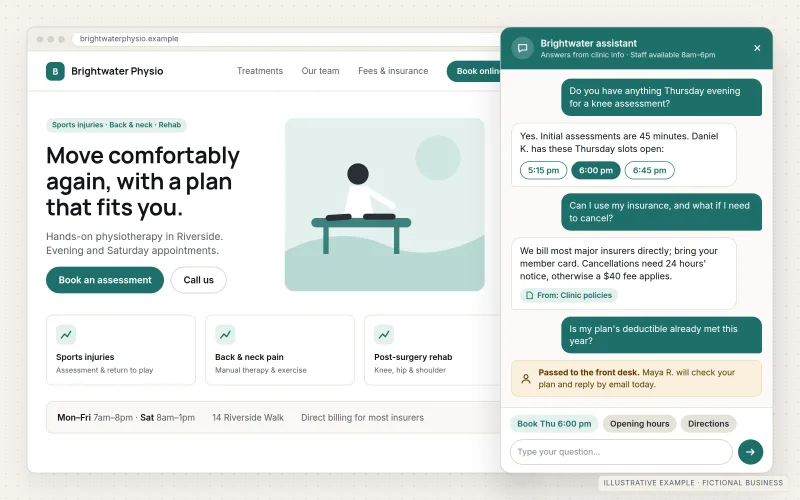
What IOPIA provides
What the work includes
- 01
Scope and question inventory
A written list of the questions the assistant should answer, the ones it must decline and the ones that always go to a person.
- 02
Approved knowledge source
Your service pages, policies, FAQs and documents gathered, cleaned up and approved by you as the only material the assistant answers from.
- 03
Assistant configuration
Instructions, tone, refusal rules and answer format set up on a commercial language model, without training a model on your data.
- 04
Human handoff
A clear route to a person — a contact form, an email to the right team or a CRM record — with the conversation so far attached.
- 05
Pre-launch review
A set of real and awkward test questions run with you, with wrong or risky answers fixed before anyone outside the business sees it.
- 06
Placement and monitoring
The assistant placed on your website or an internal channel, with conversation logs available for regular review.
Problems solved
When this helps
- Staff answer the same questions about hours, services, eligibility and pricing structure every day.
- Visitors leave the website after hours because nobody is there to answer a simple question.
- Internal policies and procedures exist, but staff can't find the right page when they need it.
- A previous chatbot gave confident answers that weren't true, and the business switched it off.
Who it's for
- Service businesses that receive a steady volume of repeat questions
- Teams with written policies or procedures that staff need to look up quickly
- Businesses that want after-hours answers on their website without promising instant human replies
A good fit when the answers already exist in writing, the business is willing to approve that content, and someone will review conversations after launch.
Not the right service when the goal is to automate a multi-step process such as routing requests or creating records — see Workflow & Business Process Automation — or when the answers depend on professional judgment the business can't write down.
How it works
How a grounded assistant answers
Select a part of the diagram to see what it does.
- A website visitor or staff member asks a question in plain language.
- The assistant looks only at the business's approved content and checks the question against its scope rules.
- If the question is in scope and the content covers it, the assistant answers from that content.
- If not, it says so and hands the conversation to a person, with the context attached.
- Conversations are reviewed regularly, and the approved content is updated where answers were missing or wrong.
Scope
Included, and not included
Included
- Use-case definition and the list of in-scope and out-of-scope questions
- Collecting and preparing the approved content the assistant answers from
- Assistant instructions, tone and refusal behavior
- Human handoff to email, a form or a CRM
- Data-handling choices agreed in writing: which model provider, what is logged and for how long
- Testing against real questions and a review session before go-live
- Website or internal placement, plus conversation review as a managed option
Not included
- Any promise that answers will always be correct — every assistant can make mistakes, which is why scope limits, handoff and review are built in
- Training or fine-tuning a proprietary AI model
- Fully autonomous decisions, such as approving refunds or giving legal, medical or financial advice
- Automating the steps that follow a conversation, which belongs to Workflow & Business Process Automation
Not sure where your project sits? Contact us about scope — we'll say plainly what fits.
Implementation
How implementation works
Define the job
Agree who the assistant serves, which questions it answers and where it must stop and hand over.
Prepare the content
Gather the pages and documents it will rely on, fix gaps and contradictions, and get your approval.
Configure and connect
Set up the model, instructions and handoff route, using the data-handling choices agreed up front.
Test with you
Run real questions, edge cases and attempts to push it off-topic, then correct what goes wrong.
Launch and review
Go live in one place first, read the conversation logs and update the content as questions change.
- Project — a one-time implementation with a defined scope.
- Managed — a recurring service after launch.
Technologies
Platforms that may be involved
The model and placement are chosen per project. An assistant may use:
- Commercial language models from providers such as OpenAI, Anthropic or Google, accessed through their APIs
- Retrieval over your approved documents so answers come from your content
- A website chat widget or an internal channel such as Microsoft Teams
- Email, form or CRM connections for human handoff
- Conversation logging with retention settings agreed in advance
Platform names are used to describe the work. They do not indicate a partnership or certification.
Questions
- Can the assistant give wrong answers?
- Yes. Language models can misread a question or phrase something inaccurately, even when grounded in good content. Limiting the assistant to approved material, defining what it must decline, offering a route to a person and reviewing logs reduce that risk; they do not remove it.
- Is our information used to train AI models?
- IOPIA does not train models on your data. Which model provider is used, what their data terms are, what gets logged and how long it is kept are agreed with you before anything is connected.
- Can it look up a customer's order or account?
- Only where your systems offer a secure way to do it and the risk is acceptable. Most first assistants answer general questions; connecting to customer records is scoped separately and reviewed carefully.
Discuss AI Assistants & Chatbots with IOPIA.
Describe the project or problem in your own words. Early-stage conversations are welcome — you don't need a finished brief.