
Web & Software DevelopmentApplications & Business Software
Custom business software
Internal software built around the way your team already works, replacing the spreadsheets, inboxes and workarounds that hold a process together today.
Contact us about this serviceWhat it looks like
An example of the finished work
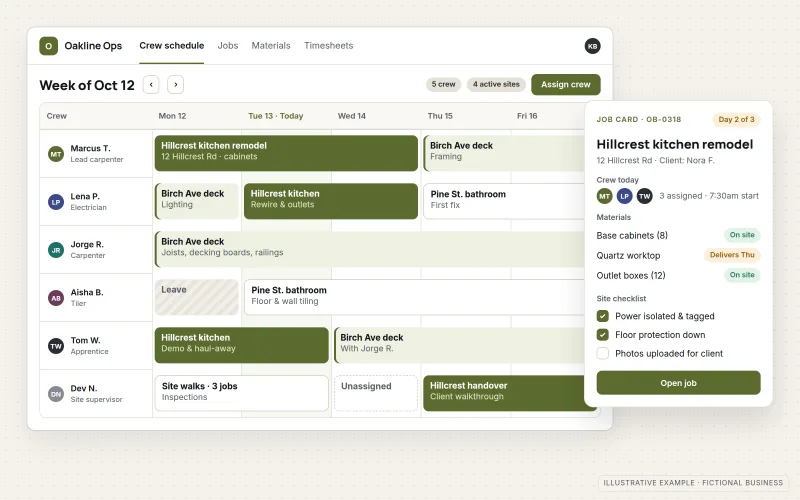
What IOPIA provides
What the work includes
- 01
Process mapping
A step-by-step map of the current process, including handoffs, approvals, exceptions and where information is re-entered.
- 02
One source of records
A single database for jobs, customers, items or cases, replacing copies spread across spreadsheets and folders.
- 03
Staff screens
Task lists, forms and status views for each role, so people see what needs doing next instead of searching for it.
- 04
Rules and approvals
Statuses, required fields, approval steps and notifications that enforce the process consistently.
- 05
Data migration
Existing spreadsheet and system records cleaned, de-duplicated and imported, with a check that totals match.
- 06
Reports and exports
Built-in reports for the numbers managers ask for, and exports to accounting or other tools.
Problems solved
When this helps
- The business runs on a set of spreadsheets that only one or two people fully understand.
- Nobody can answer "where is this job?" without asking around or opening several files.
- Off-the-shelf software was tried, but the team went back to spreadsheets because it forced the wrong process.
- Information is typed in more than once, and the copies disagree.
Who it's for
- Operations, field-service and project-based businesses tracking work by hand
- Growing teams whose spreadsheets have become the system
- Businesses whose process is specific enough that packaged software doesn't fit
A good fit when a core internal process is repeated every day, involves several people and currently lives in spreadsheets, email and memory.
If a standard product such as a CRM can do the job with configuration, CRM Setup & Integration is usually cheaper to run. If the process only needs existing tools to pass data along, see Workflow & Business Process Automation. Software built mainly for customers or the public belongs under Web Application Development.
How it works
From scattered files to one system
Select a part of the diagram to see what it does.
- Today the process lives in several spreadsheets and in shared inboxes where requests and approvals arrive.
- Those records are cleaned, de-duplicated and mapped to a single data model during migration.
- The business system then holds one record per job, item or case, with the rules of the process built in.
- Staff work from screens showing their tasks and statuses, and managers get reports and exports from the same data.
Scope
Included, and not included
Included
- Interviews with the people who do the work
- Current-process map and agreed future process
- Data model for the business records
- Role-based screens, statuses and approval steps
- Notifications by email or chat
- Migration of existing spreadsheet and system data
- Reports, exports and an audit trail of changes
- Staff walkthroughs and written guides
Not included
- On-site installation, training sessions in person or hardware setup
- Replacing accounting or payroll systems — the software connects to them instead
- Native mobile apps for app stores
- Guaranteed time or cost savings
Not sure where your project sits? Contact us about scope — we'll say plainly what fits.
Implementation
How implementation works
Shadow the process
Interview the people involved and walk through real examples, including the exceptions that spreadsheets quietly absorb.
Agree the future process
Decide which steps stay, which disappear and which the software should enforce, before any screens are designed.
Build the core records
Build the data model and the main screens first, and load a sample of real data to test them against.
Migrate and run in parallel
Import the full history and run the new system alongside the old spreadsheets until the results match.
Switch over and refine
Retire the old files, then adjust screens and reports based on how the team actually uses the system.
- Project — a one-time implementation with a defined scope.
- Managed — a recurring service after launch.
- Custom — larger work that starts with discovery.
Technologies
Platforms that may be involved
Custom business software is usually browser-based so staff can use it anywhere. It may involve:
- Web frameworks and TypeScript for the staff interface
- Relational databases such as PostgreSQL
- Sign-in through Microsoft 365 or Google Workspace accounts
- APIs of accounting, CRM or messaging tools
- Spreadsheet and CSV imports for migration
Platform names are used to describe the work. They do not indicate a partnership or certification.
Questions
- Why not just buy software off the shelf?
- Often you should, and that is checked first. Custom software makes sense when the process is central to how the business operates and packaged products would force the team to work around them.
- What happens to our existing spreadsheets?
- Their data is migrated into the new system, and they are kept read-only during a parallel run until both give the same answers.
- Can it connect to our accounting software?
- If the accounting software has an API or a supported import format, yes. Invoices, customers or job costs can be sent across instead of re-typed.
Discuss Custom Business Software with IOPIA.
Describe the project or problem in your own words. Early-stage conversations are welcome — you don't need a finished brief.