
AI, Automation & DataAutomation
Workflow and business process automation
Automating the repetitive, rules-based steps between the systems your business already uses — so information moves without re-typing and nothing waits in an inbox.
Contact us about this serviceWhat it looks like
An example of the finished work
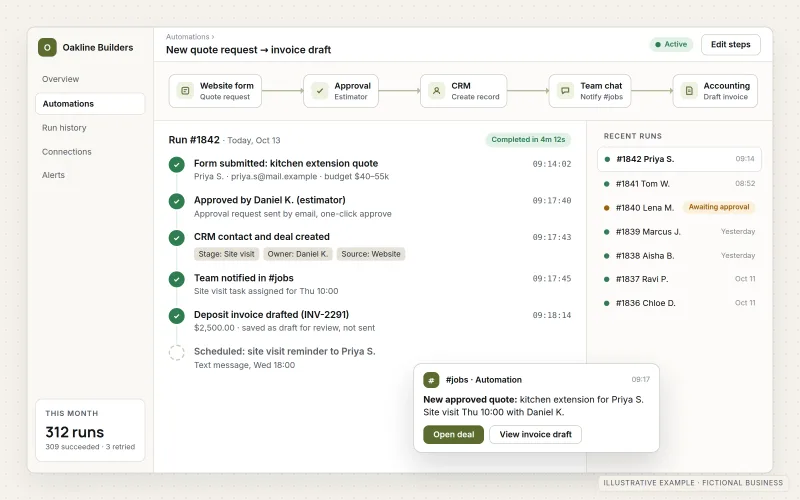
What IOPIA provides
What the work includes
- 01
Process mapping
A written map of how the work happens today: steps, systems, people and handoffs.
- 02
Automation design
Which steps to automate, which to keep manual, and how exceptions are handled.
- 03
Build and connect
Automations built with the platforms and APIs your systems already support.
- 04
AI-assisted steps where useful
Classification, summarizing or drafting steps, using AI only where it improves a defined task.
- 05
Testing with real cases
Automations checked against real examples, including the awkward ones.
- 06
Documentation and monitoring
What each automation does, what it touches and how failures are reported.
Problems solved
When this helps
- New inquiries are copied from email into a CRM by hand.
- Orders, bookings or requests wait until someone checks a shared inbox.
- The same customer details are entered into several systems.
- Follow-up emails and reminders depend on someone remembering to send them.
Who it's for
- Businesses whose staff spend hours a week on copy-and-paste work
- Teams using several systems that don't share data
- Owners who want routine follow-up to happen reliably
A good fit when a process is repeated often, follows clear rules and involves moving information between systems.
Not a good fit for one-off tasks, or processes that change every time — those usually need clarification before any automation.
How it works
An automated inquiry workflow
Select a part of the diagram to see what it does.
- A visitor submits an inquiry on the website.
- The automation validates and classifies the request.
- Routine inquiries create a CRM record and notify the right person automatically.
- Unusual cases go to a person for review first.
- CRM data feeds a regular report.
Scope
Included, and not included
Included
- Process discovery and mapping
- Automation design, including exception handling
- Building automations between existing systems
- Optional AI-assisted steps for a defined task
- Testing, documentation and handover
- Monitoring and ongoing maintenance as a managed option
Not included
- Replacing core systems such as a CRM or accounting package — scoped separately
- Automating decisions that require professional judgment
- Third-party software subscription costs, unless the agreement includes them
Not sure where your project sits? Contact us about scope — we'll say plainly what fits.
Implementation
How implementation works
Map
Document the current process, systems and handoffs.
Decide
Agree which steps to automate and which stay with people.
Build
Create the automations and connect the systems involved.
Test
Run real examples, including exceptions, before switching on.
Run
Go live with monitoring; refine as volumes and needs change.
- Project — a one-time implementation with a defined scope.
- Managed — a recurring service after launch.
- Custom — larger work that starts with discovery.
Technologies
Platforms that may be involved
Automations are built with whatever your systems support. That may include:
- Native automation features in your CRM or Microsoft 365
- Integration platforms with pre-built connectors
- Direct API and webhook integrations
- Serverless functions for custom logic
- AI language models for defined classification or drafting steps
Platform names are used to describe the work. They do not indicate a partnership or certification.
Questions
- Does automation mean using AI?
- Not necessarily. Most workflow automation is rules-based. AI is added only for a defined step — such as classifying a request — where it is genuinely useful.
- What happens when an automation fails?
- Each automation is designed with exception handling and failure notifications, so problems are visible rather than silent.
- What business data passes through automation tools?
- That is agreed for each engagement, including which third-party services may process which information.
- Whose automation platform account is used?
- Automations can run in platform accounts set up for the business or on automation infrastructure IOPIA operates. Where IOPIA's infrastructure is used, this is disclosed and agreed, together with what data passes through it and how automations and data are exported or handed over when the engagement ends.
Discuss Workflow & Business Process Automation with IOPIA.
Describe the project or problem in your own words. Early-stage conversations are welcome — you don't need a finished brief.