
Cloud & InfrastructureCloud Engineering & Networking
Cloud networking and secure connectivity
Designing the private networks inside a cloud environment and the secure connections that let people, offices and systems reach them.
Contact us about this serviceWhat it looks like
An example of the finished work
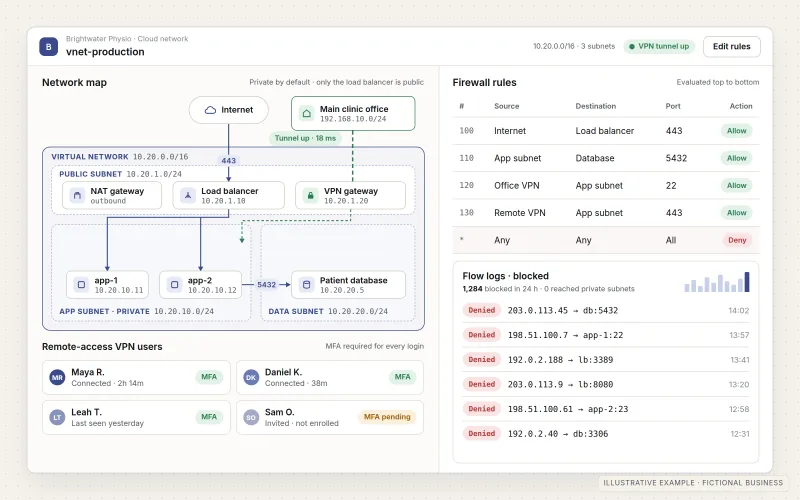
What IOPIA provides
What the work includes
- 01
Virtual network design
Virtual networks and subnets laid out so public-facing services, application servers and databases are separated and only the intended paths exist between them.
- 02
Routing and firewall rules
Route tables, security groups and network firewall rules that allow required traffic and deny the rest, each rule recorded with its purpose.
- 03
Private connectivity
Private endpoints and internal connections so applications reach databases and cloud services without crossing the public internet where avoidable.
- 04
VPN connections
Site-to-site VPNs between a cloud network and an existing office or network gateway, and remote-access VPNs for staff, configured in the cloud and on supported endpoints.
- 05
Identity-aware access
Zero-trust access, where it suits, that checks who the user is and the state of their device before granting access to a specific internal application.
- 06
Network logging and DNS
Private DNS within the environment, plus flow logs and alerts that show which traffic is reaching which systems.
Problems solved
When this helps
- Databases and admin panels are reachable from the public internet because that was the quickest way to connect.
- Remote staff share one VPN login, and nobody is sure who still has access.
- Firewall rules have accumulated over time and nobody knows which ones can safely be removed.
- An office or partner system needs a private connection to cloud resources, and the current setup relies on open ports.
Who it's for
- Businesses running applications or internal systems in a public cloud that need properly segmented networks
- Remote and hybrid teams that need controlled access to internal applications and data
- Organizations connecting an existing office network or partner system to cloud resources
A good fit when cloud-hosted systems need private networks, clear traffic rules and secure, accountable ways for people and sites to reach them.
Public DNS, caching and protection in front of a website are covered by DNS, CDN & Edge Services. Sign-in, multi-factor authentication and account permissions across business apps belong to Identity & Access Security. Building the wider environment the network serves is Cloud Engineering & Architecture, and day-to-day device and user support is Managed IT Services.
How it works
Secure paths into a cloud network
Select a part of the diagram to see what it does.
- Remote staff connect through a VPN or identity-aware access that checks who they are before letting them in.
- An office or existing site connects through a site-to-site VPN rather than open ports.
- Inside the virtual network, routing and firewall rules allow only the agreed traffic between subnets.
- Applications and databases sit in private subnets that are not exposed directly to the internet.
- Flow logs and alerts record which traffic reaches which systems, so unusual activity can be reviewed.
Scope
Included, and not included
Included
- Review of the current network layout, rules and access paths
- Virtual network, subnet and routing design
- Security groups, network firewall rules and network access controls
- Private endpoints and internal connectivity between cloud services
- Site-to-site VPN configuration on the cloud side and supported gateways
- Remote-access VPN or identity-aware access for staff
- Private DNS within the cloud environment
- Flow logging, monitoring, alerts and network documentation
Not included
- Office network layout, Wi-Fi, switches, routers and cabling — planning for these is Network Design & Consulting
- Public website DNS and CDN — see DNS, CDN & Edge Services
- Compliance certification, penetration testing or a promise that a network cannot be breached
- Internet service from the business's connectivity provider
Not sure where your project sits? Contact us about scope — we'll say plainly what fits.
Implementation
How implementation works
Map
Document the existing networks, rules, VPNs and who or what needs to reach each system.
Design
Agree the network layout, the traffic each path allows and how people and sites will connect.
Configure
Build networks, routing, rules and connections, defined as code where the environment supports it.
Test and cut over
Confirm that permitted traffic works and blocked traffic is refused, then switch users and sites over in planned stages.
Monitor and review
Watch flow logs and alerts, review access and rules periodically and keep the network documentation current.
- Project — a one-time implementation with a defined scope.
- Managed — a recurring service after launch.
- Custom — larger work that starts with discovery.
Technologies
Platforms that may be involved
Platforms and approaches are selected to suit the project and the customer-specific accounts involved. Names below are examples, not partnerships or certifications. The work may involve:
- Virtual networking on major public cloud platforms such as AWS, Microsoft Azure or Google Cloud
- The cloud platform's managed VPN gateways and network firewall services
- VPN protocols such as IPsec and WireGuard
- Identity-aware and zero-trust access services, such as Cloudflare Zero Trust
- Infrastructure-as-code tools such as Terraform for network definitions
Platform names are used to describe the work. They do not indicate a partnership or certification.
Questions
- Do you set up office Wi-Fi or network equipment?
- Not as part of this service, which covers cloud networks and the connections into them, configured remotely. Planning an office network — layout, Wi-Fi coverage, switches and router or firewall equipment — is Network Design & Consulting. Physical installation may be considered by special request, subject to scope, location and availability.
- Do we need a VPN or zero-trust access?
- It depends on what people need to reach. A VPN suits broad access to a private network or a link between sites; identity-aware access suits granting individual users access to specific internal applications. Many setups use both.
Discuss Cloud Networking & Secure Connectivity with IOPIA.
Describe the project or problem in your own words. Early-stage conversations are welcome — you don't need a finished brief.