
Business SolutionsCRM, ERP, Booking & Payments
CRM setup and integration
One place for every lead, customer and deal, fed by your website forms and connected to the tools your team already uses.
Contact us about this serviceWhat it looks like
An example of the finished work
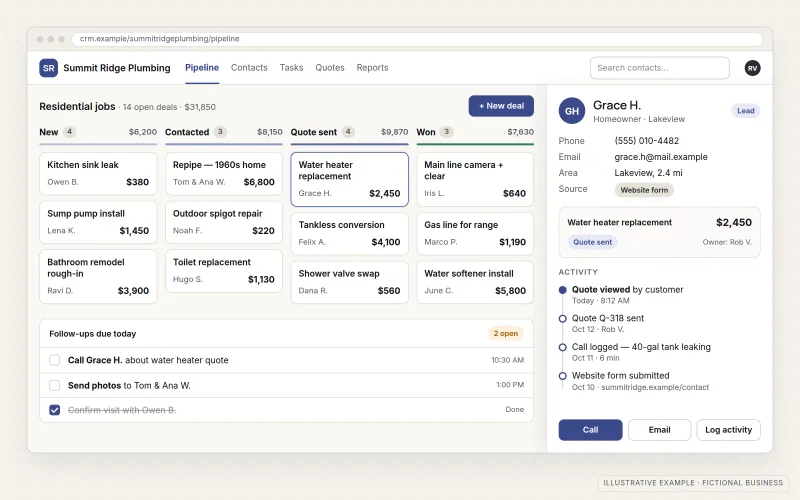
What IOPIA provides
What the work includes
- 01
Pipeline design
Deal stages that reflect how the business actually wins work, from first inquiry to signed customer.
- 02
Fields and records
Contact, company and deal fields chosen deliberately, so the information the team needs is captured consistently.
- 03
Website lead capture
Contact and quote forms on the website sending inquiries straight into the CRM with their source recorded.
- 04
Data import
Existing contacts and deals cleaned, de-duplicated and imported from spreadsheets, inboxes or an older system.
- 05
Integrations
Connections to email, calendar booking and payment tools so activity is logged without retyping.
- 06
Reporting
Dashboards for open pipeline, lead sources and follow-up, built on fields the team actually fills in.
Problems solved
When this helps
- Leads arrive by phone, email and web form, and some are never followed up.
- Customer details are spread across spreadsheets, inboxes and sticky notes.
- A CRM was bought but nobody uses it because it doesn't match how the team sells.
- The owner can't answer simple questions like how many quotes are open or where leads come from.
Who it's for
- Small businesses replacing spreadsheets or inboxes with their first CRM
- Teams with an existing CRM that is cluttered, half-configured or unused
- Businesses that want web inquiries, bookings and payments in one customer record
A good fit when the business has a repeatable way of turning inquiries into customers and wants it tracked in one system.
If the main need is generating more inquiries in the first place, start with Lead Generation Systems; if the CRM is set up and the goal is moving data between many systems, see API & System Integration; if orders, inventory, purchasing and finance need one shared system, see ERP Solutions.
How it works
A connected CRM
Select a part of the diagram to see what it does.
- Inquiries from website forms arrive in the CRM automatically, tagged with where they came from.
- Existing contacts and deals are cleaned and imported once, so the CRM starts complete.
- Each opportunity moves through pipeline stages that match how the business sells.
- Email, booking and payment tools log their activity against the same customer record.
- Reports draw on that single record to show lead sources, open deals and follow-up gaps.
Scope
Included, and not included
Included
- Platform selection support based on team size and process
- Pipeline stages, deal properties and contact fields
- User accounts, roles and visibility settings
- Website form connection with lead source tracking
- Import and de-duplication of existing records
- Email and calendar connection for activity logging
- Booking and payment tool integrations where the platforms support them
- Starter reports and a short guide for the team
Not included
- CRM subscription costs, billed by the provider or passed through as set out in the agreement
- Writing sales scripts or running sales training
- Large-scale custom CRM development, which is scoped as Custom Business Software
- Buying contact lists or sending unsolicited bulk email
Not sure where your project sits? Contact us about scope — we'll say plainly what fits.
Implementation
How implementation works
Map the process
Walk through how a lead arrives, who handles it and what makes it a customer.
Configure
Build pipelines, fields, users and permissions around that process.
Import
Clean existing data, agree on how duplicates are merged and load the records.
Connect
Link website forms, email, booking and payment tools, then test each connection end to end.
Adopt
Walk the team through daily use, review early data and adjust fields that aren't working.
- Project — a one-time implementation with a defined scope.
- Managed — a recurring service after launch.
Technologies
Platforms that may be involved
The platform is selected for each customer from their requirements, budget and existing systems — there is no single CRM used for every business. Examples, not partnerships or certifications:
- HubSpot
- Zoho CRM
- Pipedrive
- Salesforce
- Website form tools and site builders
- Calendar, email and payment tools with CRM connections
Platform names are used to describe the work. They do not indicate a partnership or certification.
Questions
- Which CRM should we use?
- It depends on your requirements, budget and existing systems — team size, how complex the sales process is and which tools the CRM must connect to. IOPIA compares a short list of platforms against those needs before anything is purchased, and can set up the one you already have if it fits.
- Can you move our data out of spreadsheets or an old CRM?
- Yes. Records are cleaned and mapped to the new fields before import, and duplicates are handled by rules you agree to in advance. Very messy data may need a decision from you on what to keep.
Discuss CRM Setup & Integration with IOPIA.
Describe the project or problem in your own words. Early-stage conversations are welcome — you don't need a finished brief.