
Business SolutionsCRM, ERP, Booking & Payments
Booking and scheduling systems
Customers book available times online, reminders go out on their own and every appointment lands on the right calendar.
Contact us about this serviceWhat it looks like
An example of the finished work
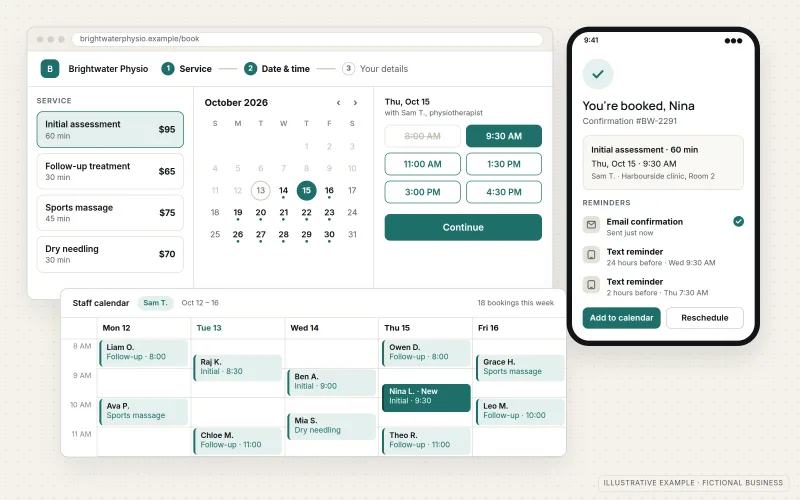
What IOPIA provides
What the work includes
- 01
Booking pages
Online booking for each service or appointment type, embedded in or linked from your website.
- 02
Availability rules
Working hours, buffers between appointments, minimum notice and booking limits set to match how the business runs.
- 03
Calendar sync
Two-way connection with staff calendars in Google Workspace or Microsoft 365, so existing commitments block booked times.
- 04
Reminders and confirmations
Confirmation and reminder messages by email, and by text message where the booking tool supports it.
- 05
Deposits and prepayment
Deposits or full payment collected at booking through a connected payment provider, where it suits the service.
- 06
Intake and records
Booking questions that gather what you need in advance, with new appointments added to the CRM.
Problems solved
When this helps
- Scheduling one appointment takes several emails or a game of phone tag.
- Customers book times that conflict with meetings already on a staff calendar.
- No-shows cost the business time because nobody had a reminder or anything at stake.
- Appointment details live in the booking tool and never reach the customer record.
Who it's for
- Appointment-based businesses such as consultants, clinics, salons and home-service providers
- Teams where several staff members each keep their own schedule
- Businesses replacing a phone-and-email scheduling routine
A good fit when appointments follow predictable lengths and rules, and customers would rather pick a time than wait for a callback.
If scheduling depends on complex logic such as routing crews across regions or matching specialized equipment, a purpose-built tool from Web Application Development may be needed instead.
How it works
How an online booking flows
Select a part of the diagram to see what it does.
- The customer opens the booking page from your website and sees only times that are actually available.
- Availability rules and two-way calendar sync keep booked appointments and existing staff commitments from overlapping.
- Once a time is chosen, confirmations and reminders go out automatically before the appointment.
- Where the service calls for it, a deposit or full payment is taken through a connected payment provider.
- The appointment and the customer's answers are added to the CRM so the whole history stays in one place.
Scope
Included, and not included
Included
- Booking tool selection support or review of an existing tool
- Services, durations, staff and location types (in person, phone or video)
- Availability rules, buffers, notice periods and limits
- Calendar sync with Google Workspace or Microsoft 365
- Confirmation, reminder, rescheduling and cancellation messages
- Deposits or prepayment through a connected payment provider
- Booking form questions and CRM connection
- Embedding or linking booking pages on the website
Not included
- Booking tool subscription costs, billed by the provider or passed through as set out in the agreement
- Cancellation or refund policy wording, which is the business's decision
- Custom-built scheduling software, which is scoped as Web Application Development
Not sure where your project sits? Contact us about scope — we'll say plainly what fits.
Implementation
How implementation works
Map appointments
List each appointment type, who delivers it, how long it takes and what must happen before it.
Choose or review the tool
Match the requirements to a booking tool, or confirm the current one can handle them.
Configure
Set up services, staff, availability rules, reminders and any deposit step.
Connect
Sync calendars, connect payments and the CRM, and place booking pages on the website.
Test and refine
Book, reschedule and cancel test appointments, then adjust rules after the first weeks of real use.
- Project — a one-time implementation with a defined scope.
- Managed — a recurring service after launch.
Technologies
Platforms that may be involved
This service commonly works with tools such as:
- Calendly
- Acuity Scheduling
- Microsoft Bookings
- Google Calendar appointment schedules
- Stripe, for deposits and prepayment
- CRM platforms with booking connections
Platform names are used to describe the work. They do not indicate a partnership or certification.
Questions
- Will online booking work with the calendars we already use?
- Most booking tools sync with Google Calendar and Microsoft 365 calendars. Existing meetings block those times, and new bookings appear on the right person's calendar.
- Should we take a deposit when customers book?
- It depends on the service and your customers. Deposits can reduce no-shows for longer or high-value appointments, but they add a step for the customer. IOPIA can set it up either way; the policy itself is your decision.
Discuss Booking & Scheduling Systems with IOPIA.
Describe the project or problem in your own words. Early-stage conversations are welcome — you don't need a finished brief.