
AI, Automation & DataData Collection & Integration
API and system integration
Connecting the software your business already pays for, so customers, orders, invoices and contacts match everywhere without manual re-entry.
Contact us about this serviceWhat it looks like
An example of the finished work
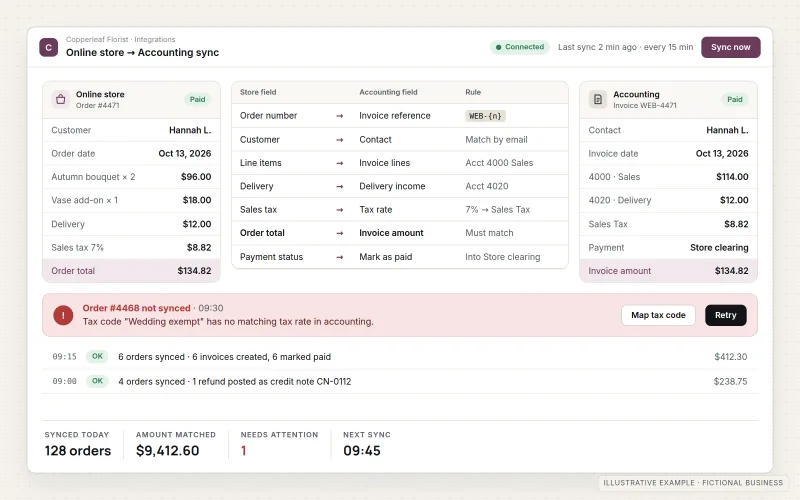
What IOPIA provides
What the work includes
- 01
System and data inventory
A list of the systems involved, the records each one holds and which system is the source of truth for each.
- 02
Field mapping document
How every field moves between systems, including formats, required values and what happens when data is missing.
- 03
Integration build
API, webhook or scheduled connections built with the access each system officially supports.
- 04
Duplicate and conflict rules
Matching rules that stop the same customer or order being created twice, and a defined winner when two systems disagree.
- 05
Error handling and alerts
Retries for temporary failures, and a notification to a named person when a record can't be synced.
- 06
Credentials and documentation
API keys and accounts issued for your business, stored securely, with ownership and access recorded and a written description of each connection.
Problems solved
When this helps
- A customer's address is updated in one system and stays wrong in the other three.
- Orders from the online store are re-typed into accounting or fulfillment software.
- Two systems claim to be connected, but nobody knows which one is correct when they disagree.
- An existing connection stopped working months ago and no one noticed until the numbers didn't match.
Who it's for
- Businesses running a CRM, store, accounting and email platform that don't share data
- Teams that rely on an old connector or script nobody fully understands
- Businesses adding a new system that has to fit alongside existing ones
A good fit when the systems already exist, offer an API or export, and the problem is that the same information has to live in more than one place.
Not the right service when the need is a multi-step process with approvals, notifications and handoffs — see Workflow & Business Process Automation — or a one-time move of historical data, which is Data Migration. Scheduled pipelines into a reporting warehouse are Data Engineering.
How it works
Keeping records in sync
Select a part of the diagram to see what it does.
- An order is placed in the online store and the payment system confirms the charge.
- Both systems send the event to the integration layer through a webhook or API call.
- The integration maps the fields, checks for an existing customer and avoids duplicates.
- The CRM and accounting system are updated with matching records.
- If a record can't be synced after retries, a named person receives an alert with the details.
Scope
Included, and not included
Included
- Review of each system's API, webhooks, limits and access options
- Source-of-truth decisions and field mapping
- One-way or two-way sync built and configured
- Duplicate detection and conflict rules
- Retries, logging and failure alerts
- Testing with real records in a safe environment where available
- Documentation, credential handover and optional ongoing monitoring
Not included
- Connecting systems that offer no API, export or supported integration method — for permitted website or portal data, see Web Scraping & Data Collection
- Building a reporting warehouse and its scheduled pipelines, which is Data Engineering
- Fixing limits or outages in the vendors' own platforms
- Third-party software or integration platform subscription costs unless covered by a disclosed, agreed IOPIA-managed arrangement; provider, usage and administration charges are identified separately
Not sure where your project sits? Contact us about scope — we'll say plainly what fits.
Implementation
How implementation works
Inventory
List the systems, the records they share and the access each one allows.
Map
Agree the source of truth and document how each field moves and transforms.
Build
Create the connections, matching rules and error handling.
Verify
Sync test records, compare both sides and check what happens when a system is unavailable.
Monitor
Switch on with alerts in place, and adjust when a vendor changes its API.
- Project — a one-time implementation with a defined scope.
- Managed — a recurring service after launch.
- Custom — larger work that starts with discovery.
Technologies
Platforms that may be involved
Each connection uses the methods the systems themselves support. That may include:
- REST and GraphQL APIs published by your software vendors
- Webhooks for near-real-time updates
- Integration platforms such as Zapier, Make or Microsoft Power Automate
- Serverless functions for custom mapping logic
- Common business systems such as CRMs, Shopify, Stripe, QuickBooks and Microsoft 365
Platform names are used to describe the work. They do not indicate a partnership or certification.
Questions
- How is this different from workflow automation?
- System integration keeps data consistent between systems — the same customer, order or invoice in each place. Workflow automation runs a business process with several steps, people and decisions. Many projects use both, with integrations as the foundation.
- What if one of our systems has no API?
- Sometimes a scheduled export and import is a workable alternative. Where the data is on a website or portal the business is permitted to use, Web Scraping & Data Collection may fit. If there is no supported way to get data in or out, IOPIA will say so rather than build something fragile.
Discuss API & System Integration with IOPIA.
Describe the project or problem in your own words. Early-stage conversations are welcome — you don't need a finished brief.