
Backup and disaster recovery
Backing up websites, applications, databases and cloud business data, with a documented restore procedure that is actually tested.
Contact us about this serviceWhat it looks like
An example of the finished work
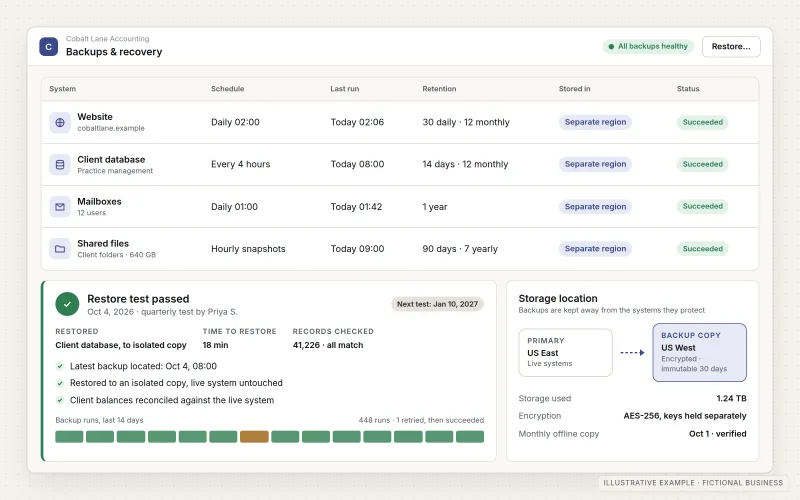
What IOPIA provides
What the work includes
- 01
System and data inventory
A list of what needs protecting — websites, applications, databases, Microsoft 365 or Google Workspace data — and who depends on each.
- 02
Recovery objectives
For each system, an agreed answer to two questions: how much recent data could the business afford to lose, and how long can it be unavailable.
- 03
Scheduled backups
Automated backups at a frequency matched to those objectives, with retention that keeps older versions as well as the latest copy.
- 04
Separate, protected storage
Backups held in storage separate from the live system and its main account, with restricted access and versioning that protects against deletion or ransomware.
- 05
Documented restore procedure
Step-by-step instructions for restoring each system, written so someone other than the original builder could follow them.
- 06
Restore testing and monitoring
Scheduled test restores, plus alerts when a backup fails, so problems are found before a real recovery is needed.
Problems solved
When this helps
- Backups are assumed to exist, but nobody has ever tried restoring one.
- The only copies of the website live on the same hosting account as the website.
- A deleted mailbox or shared folder in Microsoft 365 or Google Workspace could not be recovered beyond the platform's own retention.
- Nobody knows how long it would take to get the business's systems running again.
Who it's for
- Businesses whose website, application or online store would be costly to rebuild
- Businesses that rely on Microsoft 365 or Google Workspace for email and files
- Teams with custom applications or databases that hold records they cannot recreate
A good fit when the business depends on cloud-hosted systems and data, and wants recovery to be a documented, tested procedure rather than a hope.
Backup of on-site servers, office computers or physical hardware is not offered. For ongoing device and user support, see Managed IT Services.
How it works
A backup and recovery cycle
Select a part of the diagram to see what it does.
- Websites, applications, databases and cloud business data such as Microsoft 365 or Google Workspace are identified as systems to protect.
- Scheduled backups copy each one at a frequency matched to its agreed recovery objectives.
- The copies are kept in separate, versioned storage with restricted access, so a problem with the live system does not reach them.
- Test restores are carried out on a schedule to prove the backups can actually be used.
- What the tests show is written into a documented restore procedure, ready for a real recovery.
Scope
Included, and not included
Included
- Inventory of systems and data to protect
- Recovery point and recovery time objectives agreed per system
- Website and application backups, including files and configuration
- Database backups with retention and versioning
- Microsoft 365 or Google Workspace data backup using a third-party backup service
- Separate storage with restricted access
- Backup failure alerts and status checks
- Documented restore procedures and scheduled test restores
Not included
- On-site servers, NAS devices, office computers or other hardware
- A promise of zero data loss — recovery is limited to the most recent successful backup
- Storage and backup service charges, billed by those providers or passed through as set out in the agreement
- Incident response or forensic investigation after a security breach
Not sure where your project sits? Contact us about scope — we'll say plainly what fits.
Implementation
How implementation works
Inventory
List every system and data source, where it runs, how it is backed up today and who relies on it.
Agree objectives
Set recovery point and recovery time objectives for each system based on its importance to the business.
Configure backups
Set up scheduled backups, retention and separate storage, with access limited to the people who need it.
Document and test
Write the restore procedure for each system and carry out a test restore to confirm it works.
Monitor and repeat
Watch for failed backups, repeat test restores on a regular schedule and update procedures as systems change.
- Project — a one-time implementation with a defined scope.
- Managed — a recurring service after launch.
Technologies
Platforms that may be involved
Depending on the systems involved, backups may use:
- Hosting platform snapshot and backup features
- Managed database backup and point-in-time recovery
- Object storage with versioning, such as Cloudflare R2 or similar
- Third-party backup services for Microsoft 365 and Google Workspace
- Monitoring and alerting tools
Platform names are used to describe the work. They do not indicate a partnership or certification.
Questions
- Don't Microsoft 365 and Google Workspace already back up our data?
- They keep services running and offer limited retention for deleted items, but they are not designed as a long-term, independent backup. A separate backup protects against accidental deletion, departed staff accounts and ransomware beyond those retention windows.
- Where are the backups stored?
- In storage separate from the live system — an account set up for the business or storage IOPIA manages, as agreed. The agreement records where copies are held, who can access them and how they are handed over or deleted when the engagement ends.
- Can you guarantee we will never lose data?
- No. A restore returns systems to the most recent successful backup, so some recent changes may be lost. Recovery objectives are agreed per system to keep that gap acceptable, and regular testing confirms the procedure works.
Discuss Backup & Disaster Recovery with IOPIA.
Describe the project or problem in your own words. Early-stage conversations are welcome — you don't need a finished brief.