
Digital Marketing & CommerceLead Generation & Conversion
Campaign analytics and reporting
Turning tracked conversions, ad spend and CRM outcomes into reports that show which channels and campaigns produce inquiries, and at what cost.
Contact us about this serviceWhat it looks like
An example of the finished work
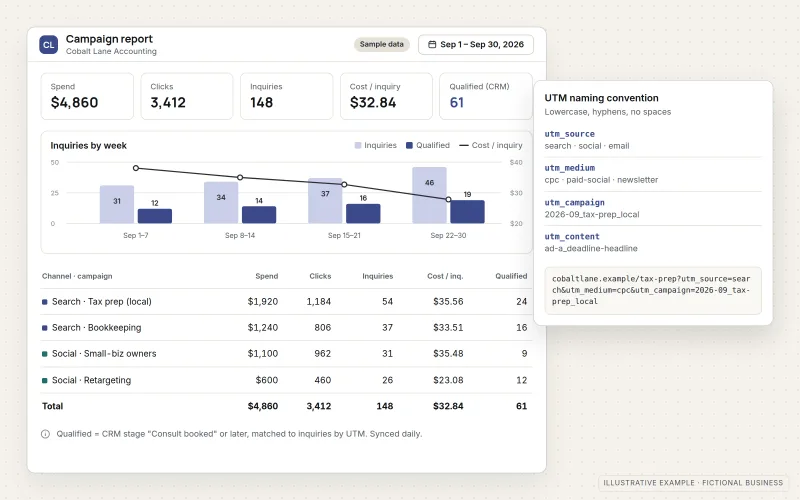
What IOPIA provides
What the work includes
- 01
UTM naming conventions
A short, written standard for source, medium and campaign tags, with a simple builder so every email, ad and social link is tagged the same way.
- 02
Channel and campaign reports
Inquiries, bookings and sales grouped by channel and campaign, so paid search, paid social, email and organic traffic can be compared directly.
- 03
Cost per inquiry
Ad spend divided by real inquiries for each campaign, rather than cost per click, so budget conversations start from what matters.
- 04
Spend matched to CRM outcomes
Campaign data joined with CRM stages, showing which inquiries became qualified leads or customers, not only which ones were submitted.
- 05
Marketing dashboards
A focused dashboard in Looker Studio or a similar tool, connected to the business's own data sources and readable without training.
- 06
Monthly review
A recurring walkthrough of what changed, possible reasons and suggested next steps for campaigns, pages and budgets.
Problems solved
When this helps
- Monthly reports show clicks and impressions but not which channel produced customers.
- Campaign links are tagged inconsistently, so traffic lands under the wrong source or none at all.
- Ad platforms claim results the sales team does not recognize.
- Budget is split between channels by habit because nobody can compare cost per inquiry.
Who it's for
- Businesses running more than one marketing channel that want a fair comparison
- Owners who receive vendor reports but cannot connect them to actual inquiries
- Teams with a CRM who want to see which campaigns produce customers, not just leads
A good fit once conversions are tracked reliably and the business is ready to make regular budget and campaign decisions from the numbers.
For company-wide dashboards covering sales, finance and operations, see Dashboards & Business Reporting. If conversions are not yet recorded reliably, start with Conversion Tracking.
How it works
From spend and outcomes to a campaign report
Select a part of the diagram to see what it does.
- Every campaign link carries consistent UTM tags, so each visit and inquiry is labeled with its source and campaign.
- Ad spend from Google and Meta is collected for the same campaigns.
- CRM records show which tagged inquiries became qualified leads or customers.
- A campaign report joins spend and outcomes to show cost per inquiry and cost per customer.
- A monthly review turns the report into decisions about campaigns, pages and budgets.
Scope
Included, and not included
Included
- Review of current reporting and the questions it should answer
- UTM convention, naming guide and link builder
- Channel grouping that matches how the business markets
- Connections to GA4, Google Ads, Meta and the CRM
- Cost per inquiry and cost per customer by campaign
- Marketing dashboard in Looker Studio or a similar tool
- Written notes explaining definitions and known data gaps
- Monthly review meeting or written summary
Not included
- Conversion and tag setup — see Conversion Tracking
- Business-wide reporting beyond marketing — see Dashboards & Business Reporting
- Campaign management and bid changes — see Google Ads Management or Meta Ads Management
- Exact attribution of every sale to a single touchpoint
Not sure where your project sits? Contact us about scope — we'll say plainly what fits.
Implementation
How implementation works
Define the questions
Agree what the business needs to decide each month and which numbers would inform those decisions.
Standardize tagging
Introduce the UTM convention, fix existing links where possible and set channel groupings.
Connect the sources
Link analytics, ad platforms and the CRM so spend, conversions and outcomes can be compared by campaign.
Build the report
Create the dashboard and check its figures against each source platform before anyone relies on it.
Review monthly
Walk through results, note what changed and why, and agree adjustments to campaigns, pages or budgets.
- Project — a one-time implementation with a defined scope.
- Managed — a recurring service after launch.
Technologies
Platforms that may be involved
Reporting work typically draws on:
- Google Analytics 4
- Google Ads and Meta Ads reporting
- CRM platforms such as HubSpot
- Looker Studio or similar dashboard tools
- Spreadsheets for spend that has no direct connection
Platform names are used to describe the work. They do not indicate a partnership or certification.
Questions
- How is this different from the reports our ad platforms already provide?
- Each platform reports on itself and tends to credit itself. Campaign analytics puts every channel in one view using the same definitions, and adds what happened to each inquiry in the CRM.
- Who owns the dashboard and data?
- The dashboard reads the business's analytics, ad and CRM data. It may be built in a reporting account set up for the business or on reporting tools IOPIA provides; where IOPIA's tools are used, this is disclosed and agreed in advance. The agreement records who owns the dashboard and how the business's data and reports are exported or handed over if the engagement ends.
Discuss Campaign Analytics with IOPIA.
Describe the project or problem in your own words. Early-stage conversations are welcome — you don't need a finished brief.