
Business SolutionsDomains & Business Presence
Business domain and email setup
A domain registered to the business, DNS records that deliver and authenticate mail, and professional addresses that reach the inbox.
Contact us about this serviceWhat it looks like
An example of the finished work
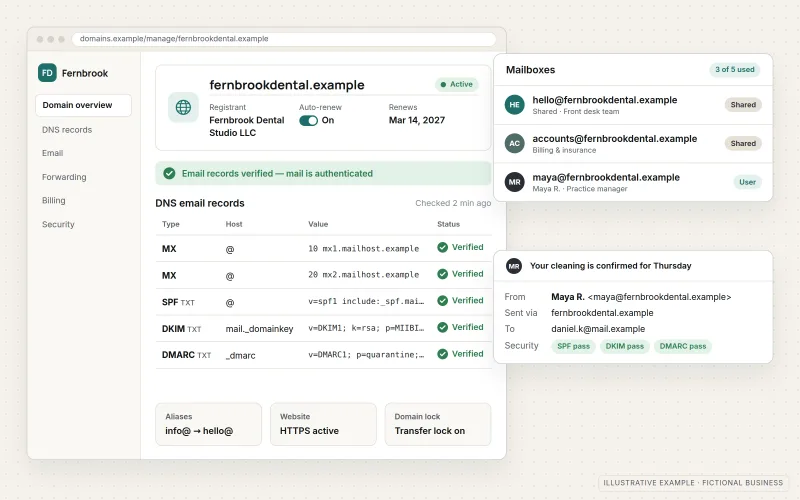
What IOPIA provides
What the work includes
- 01
Domain ownership review
A clear record of who registered the domain, which account holds it, when it renews and who can change it.
- 02
Registration or transfer guidance
A new domain registration or existing-domain transfer under the agreed account arrangement, performed with authorization or with guidance for the business. Customer ownership is the normal default; any exception must be expressly agreed and provider-permitted.
- 03
Mail delivery records
MX records pointing mail to the chosen email provider, with old or conflicting records removed.
- 04
Sender authentication
SPF, DKIM and DMARC configured so receiving servers can confirm that mail from your domain is genuine.
- 05
Professional addresses
Named mailboxes, shared addresses such as info@ or billing@, and aliases set up on Microsoft 365 or Google Workspace.
- 06
DNS documentation
A written list of every DNS record, what it does and which service depends on it, so future changes are safe.
Problems solved
When this helps
- The domain was registered years ago by a former employee or web designer, under an account nobody can open.
- The business still sends email from a free personal-style address instead of its own domain.
- Invoices and quotes sent to customers land in spam folders or are rejected outright.
- Nobody is sure which DNS records are still needed, so everyone is afraid to touch them.
Who it's for
- New businesses registering a domain and setting up email for the first time
- Businesses whose domain is held by a former vendor, employee or relative
- Teams whose email has delivery problems or no authentication records
A good fit when the domain and the records behind email need to be owned, correct and documented before anything else is built on them.
If the domain and DNS are already in order and the need is a full email and collaboration environment, see Microsoft 365 Setup & Management or Google Workspace Setup & Management instead.
How it works
From domain to inbox
Select a part of the diagram to see what it does.
- Customer ownership is the normal default for the domain. The engagement separately records administrative access, billing and offboarding, with any exception expressly agreed and provider-permitted.
- The DNS zone holds every record for the domain and is the single place mail routing is defined.
- The MX record tells other mail servers to deliver messages for your addresses to your Microsoft 365 or Google Workspace mailboxes.
- SPF lists the services allowed to send as your domain, DKIM signs each message, and DMARC tells receivers what to do when a message fails those checks.
- Recipients' mail servers check those records before deciding whether your message belongs in the inbox.
Scope
Included, and not included
Included
- Audit of the current registrar account, DNS host and renewal settings
- Authorized domain registration or transfer with customer ownership as the normal default, separately documented administrative access, billing and offboarding, and any expressly agreed provider-permitted exception
- MX records for the chosen email provider
- SPF, DKIM and DMARC records, with a DMARC policy tightened in stages
- Mailboxes, shared addresses and aliases on Microsoft 365 or Google Workspace
- Cleanup of outdated or conflicting DNS records
- Verification records for services such as website hosting and Google Business Profile
- Written documentation of the final DNS configuration
Not included
- Domain registration fees and email subscription costs, billed by the registrar and provider or passed through as set out in the agreement
- Control over how other organizations' mail servers filter messages
- Recovering a domain that a registrar has released or that a third party refuses to transfer
- Legal advice on trademark or domain name disputes
Not sure where your project sits? Contact us about scope — we'll say plainly what fits.
Implementation
How implementation works
Locate
Find the registrar, the DNS host and the account that controls each, and confirm renewal dates.
Secure ownership
Confirm the agreed owner and administrative access, register or transfer with authorization, and document billing, renewal and offboarding arrangements. Customer ownership is the normal default; any exception is expressly agreed and provider-permitted.
Configure mail
Set MX, SPF and DKIM records for the chosen provider, timed so incoming mail is not interrupted.
Authenticate
Publish a DMARC record in monitoring mode, review the reports, then tighten the policy when legitimate senders all pass.
Document
Hand over a record of every DNS entry, the accounts involved and who to contact before changing them.
- Project — a one-time implementation with a defined scope.
- Managed — a recurring service after launch.
Technologies
Platforms that may be involved
This service commonly works with:
- Domain registrars such as Cloudflare Registrar, Namecheap, Squarespace Domains and GoDaddy
- DNS hosting, including Cloudflare DNS
- Microsoft 365 (Exchange Online)
- Google Workspace (Gmail)
- Sending services used by websites and marketing tools
Platform names are used to describe the work. They do not indicate a partnership or certification.
Questions
- Do we need to move our domain to a different registrar?
- Not always. We first review the registrar, ownership, administrative access and any provider restrictions. Customer ownership is the normal default, and IOPIA may create, configure or administer the domain with authorization. Any exception must be expressly agreed and provider-permitted. Billing, renewal and offboarding are documented separately.
- Will setting up DMARC stop our email from arriving?
- Not if it is introduced carefully. DMARC starts in a monitoring mode that changes nothing about delivery, and the policy is tightened only after the reports show that every legitimate sender, such as your website or invoicing tool, passes authentication.
- Should our email be on Microsoft 365 or Google Workspace?
- Either works well for business email on your own domain. The choice usually follows which documents, calendar and collaboration tools the team already prefers; the DNS work is similar for both.
Discuss Business Domain & Email Setup with IOPIA.
Describe the project or problem in your own words. Early-stage conversations are welcome — you don't need a finished brief.