
Digital Marketing & CommerceLead Generation & Conversion
Conversion tracking
Recording the actions that matter — calls, form submissions, bookings and purchases — accurately and consistently across analytics and ad platforms.
Contact us about this serviceWhat it looks like
An example of the finished work
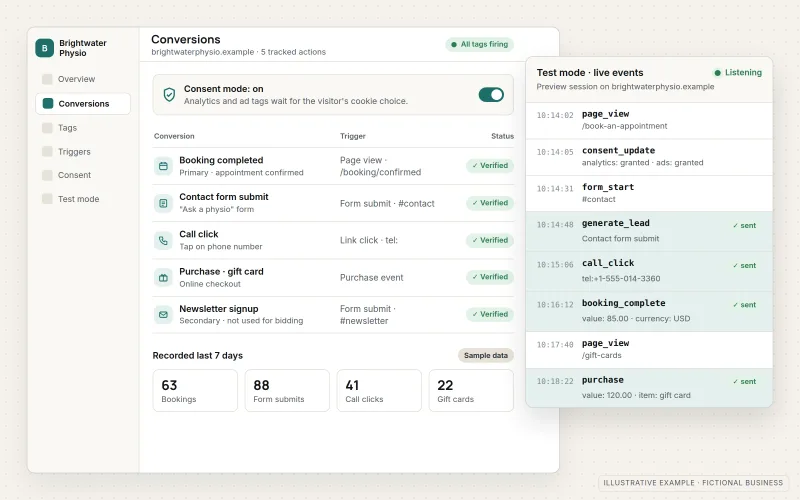
What IOPIA provides
What the work includes
- 01
Measurement plan
A written list of the actions that count as conversions, how each one is detected and which platforms receive it, agreed before anything is installed.
- 02
Google Tag Manager container
One organized container with clearly named tags, triggers and variables, replacing scattered scripts added by past vendors.
- 03
GA4 events and key events
Google Analytics 4 configured with clean events for forms, calls, bookings and purchases, and the important ones marked as key events.
- 04
Ad-platform conversions
Google Ads conversion actions and the Meta Pixel with Conversions API receiving the same defined actions, deduplicated so nothing is counted twice.
- 05
Call and form tracking
Click-to-call taps, tracked phone numbers where the business uses them, and genuine form submissions rather than thank-you page views.
- 06
Consent-aware configuration
Tags that respond to the consent banner and settings the business chooses, including Google Consent Mode and enhanced conversions where appropriate.
Problems solved
When this helps
- Google Ads, Meta and Analytics each report a different number of leads.
- Form submissions are counted from a thank-you page people can reach without submitting.
- Tags were added by several vendors over the years and nobody knows what still fires.
- Ad platforms optimize toward page views or clicks because they receive no real conversion data.
Who it's for
- Businesses spending on Google or Meta ads without reliable conversion data
- Businesses whose analytics setup was never fully configured after the move to GA4
- Websites with years of accumulated tags that nobody has reviewed
A good fit before any paid campaign launches, after a website rebuild, and whenever platforms disagree about how many inquiries arrived.
This service records conversions; it does not build the reports that compare channels and costs over time — see Campaign Analytics.
How it works
From visitor action to recorded conversion
Select a part of the diagram to see what it does.
- A visitor takes a valuable action on the website, such as submitting a form or tapping to call.
- The visitor's consent choice, set through the business's consent banner, decides which tags may collect data.
- Google Tag Manager turns the action into one clearly named event.
- That event is sent to Google Analytics 4, Google Ads and Meta, so every platform counts the same action.
- Each conversion is tested under different consent states before campaigns or reports depend on it.
Scope
Included, and not included
Included
- Audit of existing tags, analytics properties and conversion actions
- Measurement plan with named conversion events
- Google Tag Manager setup and cleanup
- Google Analytics 4 property, data streams and key events
- Google Ads conversions, including enhanced conversions where appropriate
- Meta Pixel with Conversions API and event deduplication
- Call and form tracking
- Consent banner integration and Consent Mode configuration, with QA under each consent state
Not included
- Legal advice on privacy law — the business decides its consent and privacy approach, ideally with its own legal adviser
- Tracking that ignores a visitor's consent choice
- Channel reports, dashboards and monthly review — see Campaign Analytics
- Perfect attribution — some conversions will always be unmeasured or modeled
Not sure where your project sits? Contact us about scope — we'll say plainly what fits.
Implementation
How implementation works
Audit
Inventory current tags, analytics accounts and conversion actions, and note where the numbers disagree and why.
Plan
Agree which actions count, how each is detected, which platforms receive it and how consent affects collection.
Implement
Configure Tag Manager, GA4 and ad-platform conversions, removing duplicate or abandoned tags along the way.
Quality assurance
Test each conversion in preview and debug tools with consent granted and refused, on phones and desktops, and compare counts across platforms.
Document and maintain
Record what each tag does and who has access, then keep tracking current as pages, forms and campaigns change.
- Project — a one-time implementation with a defined scope.
- Managed — a recurring service after launch.
Technologies
Platforms that may be involved
Tracking work typically involves:
- Google Tag Manager
- Google Analytics 4
- Google Ads conversion tracking and enhanced conversions
- Meta Pixel and Conversions API
- Consent management platforms
- Call tracking tools where the business uses them
Platform names are used to describe the work. They do not indicate a partnership or certification.
Questions
- Who owns the analytics and tag accounts?
- Analytics, Tag Manager and ad accounts are set up for the business — existing ones, or new customer-specific accounts created with its authorization — and IOPIA is given the access it needs to configure them. The agreement records who owns each account and its data, who has administrative access and how access is handed over or removed when the work ends.
- Why don't Google Ads and Analytics show the same numbers?
- They count and attribute conversions differently, and consent choices and browser restrictions affect each one. A clear measurement plan reduces the gaps and explains the ones that remain.
- Do you decide what our privacy policy should say?
- No. IOPIA configures tracking to follow the consent approach the business chooses, but does not give legal advice; privacy obligations should be confirmed with the business's own legal adviser.
Discuss Conversion Tracking with IOPIA.
Describe the project or problem in your own words. Early-stage conversations are welcome — you don't need a finished brief.