
Digital Marketing & CommerceLead Generation & Conversion
Lead generation systems
The system behind every inquiry — offer, capture form, qualification, routing, CRM handoff and follow-up — so each lead reaches the right person and is recorded.
Contact us about this serviceWhat it looks like
An example of the finished work
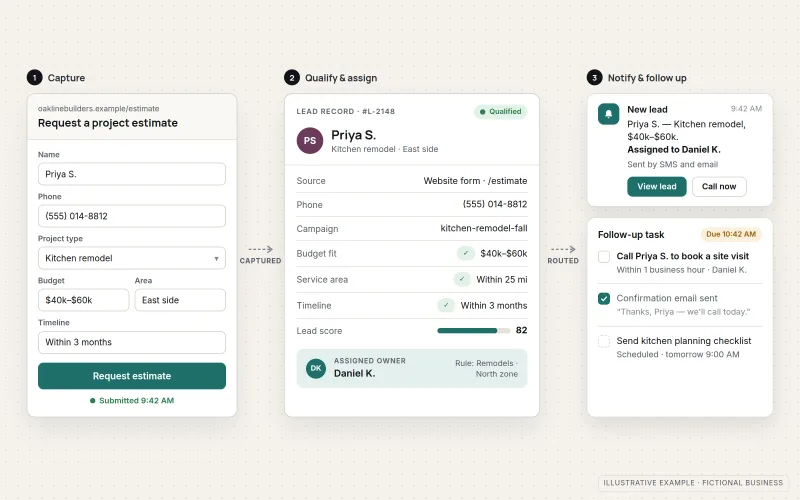
What IOPIA provides
What the work includes
- 01
Offer definition
A clear statement of what the visitor gets in exchange for their details — a quote, consultation, estimate, callback or booking.
- 02
Capture forms
Forms that ask only for what the business needs to respond, with validation, sensible error messages and a confirmation the visitor can trust.
- 03
Qualification fields
A few well-chosen questions — service needed, location, timing or budget range — that help sort inquiries without discouraging people from submitting.
- 04
Routing rules
Each inquiry assigned to the right person or team by service, area or source, with a fallback so nothing goes unowned.
- 05
CRM handoff
Every submission created as a contact or deal in the CRM, carrying its source, campaign, page and answers to the qualification fields.
- 06
Follow-up and notifications
An instant confirmation to the inquirer, an alert to the assigned person and follow-up tasks or reminders so slow responses are visible.
Problems solved
When this helps
- Inquiries arrive in a shared inbox and some are never answered.
- Forms collect spam or junk submissions that bury the real ones.
- Staff cannot tell which inquiries are serious until they call each one back.
- Leads from the website, ads and social messages end up in different places, and few reach the CRM.
Who it's for
- Service businesses whose inquiries are scattered across email, phone and social messages
- Teams with a CRM that many leads never reach
- Businesses about to increase ad spend that need inquiries handled consistently first
A good fit when the business has a defined offer and wants every inquiry captured, sorted, assigned and followed up the same way, whichever channel it came from.
If the main need is a page built for a specific campaign, see Landing Pages. If the CRM itself still needs choosing or configuring, start with CRM Setup & Integration.
How it works
How an inquiry is captured and routed
Select a part of the diagram to see what it does.
- A visitor submits a capture form on a website page, landing page or other channel.
- Spam protection screens out junk, and qualification fields record what the person needs.
- Routing rules assign the inquiry to an owner based on service, area or source.
- The inquiry is created in the CRM with its source, campaign and answers.
- The owner is notified, the inquirer receives a confirmation and follow-up reminders keep the lead from being forgotten.
Scope
Included, and not included
Included
- Mapping of lead sources, offers and who owns each inquiry
- Capture forms with validation and accessible labels
- Spam protection such as challenge services, honeypot fields and rate limits
- Qualification fields agreed with the people who follow up
- Routing rules by service, area or source, with a fallback owner
- CRM handoff with source, campaign and page details
- Confirmation messages, staff alerts and follow-up reminders
- End-to-end testing of every route
Not included
- Purchased lead lists, scraped contacts or unsolicited bulk messaging
- Campaign page copy and design — see Landing Pages
- Promised lead volumes or close rates
- Selecting and configuring the CRM platform — see CRM Setup & Integration
Not sure where your project sits? Contact us about scope — we'll say plainly what fits.
Implementation
How implementation works
Map sources and owners
List where inquiries come from today, what each offer is, and who is responsible for responding to which type.
Design the capture
Agree form fields, qualification questions and spam protection with the people who will act on the leads.
Connect the routing
Build the rules that assign each inquiry, create the CRM record and send confirmations and alerts.
Test every route
Submit test inquiries for each service, area and source, and confirm each one lands, routes and notifies correctly.
Review lead handling
Look at submission quality, response times and unowned leads, then adjust fields, rules or reminders.
- Project — a one-time implementation with a defined scope.
- Managed — a recurring service after launch.
Technologies
Platforms that may be involved
Depending on the business, the system may use:
- Website or landing page forms
- Form tools and spam protection services
- CRM platforms such as HubSpot
- Email and SMS notification tools
- Automation tools that connect forms to other systems
- Shared inboxes or spreadsheets as an interim destination
Platform names are used to describe the work. They do not indicate a partnership or certification.
Questions
- Do we need a CRM for this?
- A CRM is strongly recommended because it keeps every inquiry and its follow-up in one place. Where a business is not ready for one, inquiries can be routed to a shared, structured inbox or spreadsheet as an interim step.
- Will qualification questions reduce the number of inquiries?
- Every extra field can, which is why IOPIA keeps them few and agrees each one with the people following up. The aim is just enough information to respond well, not a full intake interview.
Discuss Lead Generation Systems with IOPIA.
Describe the project or problem in your own words. Early-stage conversations are welcome — you don't need a finished brief.