
Web & Software DevelopmentApplications & Business Software
Web application development
Software that runs in the browser, where people sign in, enter information and get work done, rather than only read pages.
Contact us about this serviceWhat it looks like
An example of the finished work
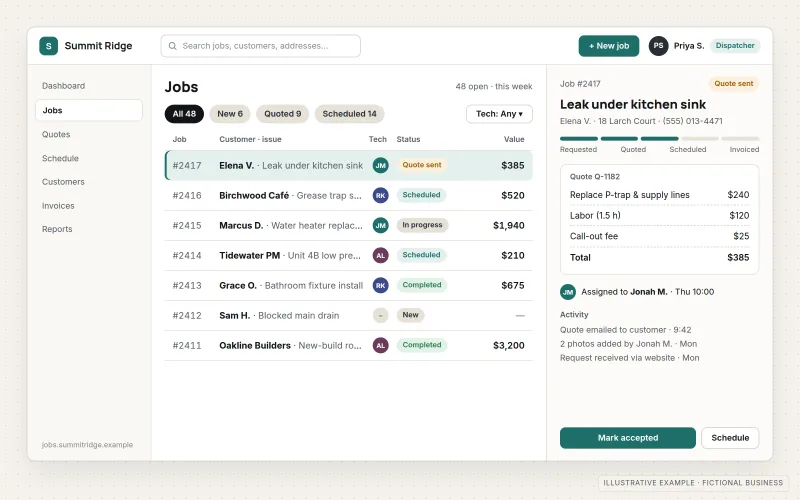
What IOPIA provides
What the work includes
- 01
Requirements and user flows
Written descriptions of who uses the application, what each type of user needs to do and the rules the system must enforce.
- 02
Data model
A database design for the records the application keeps, how they relate and who may see or change each one.
- 03
Accounts and permissions
Sign-in, password reset, roles and access rules, with options such as single sign-on or multi-factor authentication where needed.
- 04
Interface and screens
Responsive screens for forms, lists, search and detail views that work on desktop and mobile browsers.
- 05
Integrations
Connections to email, payment, calendar or other systems through their APIs, so data isn't copied by hand.
- 06
Deployment and monitoring
Separate test and live environments, automated backups, error logging and a documented release process.
Problems solved
When this helps
- A process depends on forms, email and copy-paste between tools, and things fall through the gaps.
- An off-the-shelf product covers most of the need, but not the part that makes the business different.
- An existing internal tool was built quickly and is now fragile, slow or impossible to change safely.
- An idea for a subscription or online service needs a working first version to test with real users.
Who it's for
- Businesses that need a signed-in tool for customers, staff or partners
- Founders who need a first working version of an online product
- Teams replacing a fragile in-house tool with something maintainable
A good fit when the need is clear enough to describe as users, tasks and rules, and no existing product handles it well enough.
If the application is mainly an internal operations system replacing spreadsheets, see Custom Business Software. If the goal is to let existing customers view their account and documents, Customer Portals is the closer match. For an app installed from the app stores on iOS and Android, see Mobile App Development.
How it works
How a web application is put together
Select a part of the diagram to see what it does.
- Users open the application in a browser and sign in, which determines what their role allows.
- They work through screens designed for their tasks on desktop or mobile.
- The application logic checks each action against the business rules before accepting it.
- Accepted changes are saved in the database, and the application exchanges data with other services such as email or payments through their APIs.
Scope
Included, and not included
Included
- Requirements, user roles and user-flow documentation
- Data model and database design
- Authentication, roles and permissions
- Responsive front-end screens
- Server-side logic, validation and APIs
- Third-party integrations through documented APIs
- Test and live environments, backups and error monitoring
- Progressive web app setup where installable access helps
Not included
- Apps distributed through the app stores — see Mobile App Development
- Compliance certification such as HIPAA or SOC 2, or legal review
- Product strategy and market validation beyond the agreed requirements
- Integrations with systems that offer no API or export
Not sure where your project sits? Contact us about scope — we'll say plainly what fits.
Implementation
How implementation works
Define users and rules
Describe each type of user, their tasks and the rules the application must enforce, and agree what the first version includes.
Model the data
Design the records, relationships and permissions before screens are built, since they are the hardest part to change later.
Prototype key screens
Click through the main flows as a prototype and adjust them with the people who will use them.
Build in increments
Develop and release working features to a test environment in stages, so progress can be reviewed as it happens.
Release and support
Move to the live environment with backups and monitoring in place, then continue with fixes and new features if needed.
- Project — a one-time implementation with a defined scope.
- Managed — a recurring service after launch.
- Custom — larger work that starts with discovery.
Technologies
Platforms that may be involved
The stack is chosen to suit the application and who will maintain it. It may include:
- TypeScript front ends with frameworks such as React or Astro
- Node.js server code and REST or GraphQL APIs
- Relational databases such as PostgreSQL
- Managed authentication services or standards such as OAuth and OpenID Connect
- Cloud hosting and serverless platforms such as Cloudflare
Platform names are used to describe the work. They do not indicate a partnership or certification.
Questions
- Can it work on phones without an app store app?
- Yes. Web applications are built to work in mobile browsers, and many can be set up as progressive web apps that install to the home screen. Apps distributed through the iOS and Android app stores are covered by Mobile App Development.
- Who owns the code?
- Ownership of code and data is agreed in the project terms before work starts. The application is documented so another developer could maintain it.
- Can we start small?
- Yes, and it is usually the better approach. The first version covers the core users and tasks, and further features are added once it is in real use.
Discuss Web Application Development with IOPIA.
Describe the project or problem in your own words. Early-stage conversations are welcome — you don't need a finished brief.