
Cloud & InfrastructureHosting, DNS & Edge
DNS, CDN and edge services
Managing the layer between visitors and a website — DNS, SSL, caching, edge protection and redirects — using Cloudflare.
Contact us about this serviceWhat it looks like
An example of the finished work
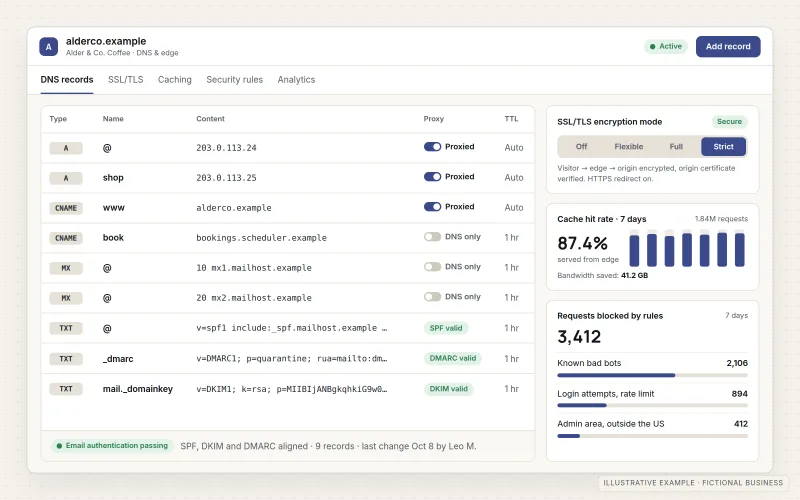
What IOPIA provides
What the work includes
- 01
DNS management
A clean, documented set of DNS records, with unused entries identified and changes made deliberately rather than by trial and error.
- 02
SSL/TLS configuration
Encrypted connections from visitor to edge and from edge to origin, with HTTPS enforced and certificate settings that match the hosting.
- 03
CDN caching
Cache rules that serve static files and suitable pages from the edge, while keeping logins, carts and forms uncached.
- 04
WAF and edge protection
Firewall, rate-limiting and bot rules that block common attack patterns and abusive traffic before it reaches the website.
- 05
Redirects and DNSSEC
Redirect rules for domain changes and old URLs, and DNSSEC enabled where the registrar supports it.
- 06
Email DNS coordination
MX, SPF, DKIM and DMARC records kept correct alongside website records, coordinated with whoever runs the email platform.
Problems solved
When this helps
- Nobody knows which DNS records are still needed, so every change feels risky.
- The site shows certificate warnings or loops between HTTP and HTTPS.
- Bots and repeated login attempts are slowing the site or filling its logs.
- After a redesign, old links return errors instead of redirecting to the new pages.
Who it's for
- Businesses moving a domain's DNS to Cloudflare or tidying an existing Cloudflare account
- Websites that need faster delivery and basic protection from abusive traffic
- Businesses changing domains, hosting or website platforms that need redirects and DNS cut-over planned
A good fit when a business's domain, website and email all depend on DNS that should be understood, documented and protected.
If the site's hosting itself needs choosing or moving, start with Website & Application Hosting. Registering domains and setting up mailboxes is covered by Business Domain & Email Setup.
How it works
The path from visitor to website
Select a part of the diagram to see what it does.
- A visitor types the domain or follows a link, and their browser asks DNS where the site lives.
- Cloudflare DNS answers, signed with DNSSEC where enabled, and directs the request to the edge.
- At the edge the connection is encrypted, cached files are served directly, redirects are applied and suspicious traffic is filtered.
- Only requests that need fresh content travel on to the origin hosting where the website runs.
- The same DNS zone also holds the email records that tell other mail servers where to deliver mail and how to verify it.
Scope
Included, and not included
Included
- Cloudflare account and zone setup in the business's existing account or, with authorization, a new customer-specific one
- DNS record audit, cleanup and documentation
- Nameserver changes planned with the domain registrar
- SSL/TLS mode, HTTPS enforcement and HSTS where appropriate
- Cache rules and performance settings
- WAF, rate-limiting and bot management rules
- Redirect rules and DNSSEC
- Email-related DNS records coordinated with the email provider
Not included
- Protection against every attack, or a promise that the site will never go offline
- Changes to the website's code or content — see Website Management & Maintenance
- Mailbox setup and email administration — see Business Domain & Email Setup
- Internal office networking or on-site equipment
Not sure where your project sits? Contact us about scope — we'll say plainly what fits.
Implementation
How implementation works
Inventory
Export and review every existing DNS record and confirm what each one supports: website, email, verification or a retired service.
Plan the change
Agree the target configuration and a cut-over plan that keeps the website and email reachable throughout.
Configure
Set up DNS, SSL/TLS, cache rules, firewall rules and redirects, then switch nameservers at the registrar.
Verify
Check the site over HTTPS, confirm email delivery and authentication, and test redirects and protection rules.
Maintain
Keep records and rules current as services change, review security events and update the documentation.
- Project — a one-time implementation with a defined scope.
- Managed — a recurring service after launch.
Technologies
Platforms that may be involved
This work is carried out on:
- Cloudflare DNS
- Cloudflare SSL/TLS and edge certificates
- Cloudflare CDN, cache rules and redirect rules
- Cloudflare WAF, rate limiting and bot management
- The business's domain registrar
- The business's email platform, such as Microsoft 365 or Google Workspace
Platform names are used to describe the work. They do not indicate a partnership or certification.
Questions
- Will moving DNS to Cloudflare interrupt our website or email?
- It shouldn't when it is planned. Every existing record is copied and checked before nameservers change, and email records are verified so mail keeps flowing during the switch.
- Who owns the Cloudflare account?
- Cloudflare is set up in an account for the business — its existing one or, with authorization, a new customer-specific one — and IOPIA is given access to manage it. The agreement records who owns the account, who has administrative access and who is billed, and creating an account does not give IOPIA ownership of it or indefinite access.
- Does Cloudflare replace our hosting?
- No. Cloudflare sits in front of the hosting, speeding up delivery and filtering traffic. The website still runs on its hosting platform.
Discuss DNS, CDN & Edge Services with IOPIA.
Describe the project or problem in your own words. Early-stage conversations are welcome — you don't need a finished brief.