
Cloud & InfrastructureCloud Engineering & Networking
Cloud engineering and architecture
Designing and building the cloud environment that applications and business systems run in, defined as code, deployed through pipelines and documented.
Contact us about this serviceWhat it looks like
An example of the finished work
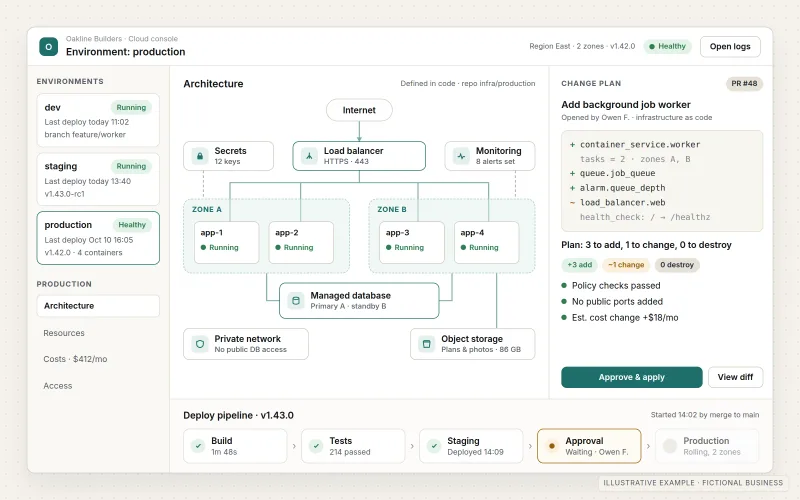
What IOPIA provides
What the work includes
- 01
Architecture design
A written design of the cloud services used, how they connect, where data lives and how the environment handles growth and failure.
- 02
Separate environments
Development, staging and production set up as distinct environments, so changes are tested away from the live system before release.
- 03
Provisioning and automation
Servers, databases, storage, networks and permissions provisioned from version-controlled infrastructure code that can be reviewed, repeated and rebuilt.
- 04
Deployment pipelines
CI/CD pipelines that build, test and release application and infrastructure changes through the same reviewed path every time.
- 05
Least-privilege access
Cloud identities, roles and service accounts limited to what each person or system needs, with administrative access kept separate and recorded.
- 06
Monitoring and cost visibility
Logging, metrics and alerts for the services that matter, plus budgets and cost reports that show where cloud spending goes.
Problems solved
When this helps
- The cloud account grew by hand, and nobody can say which resources are still in use or why they exist.
- There is only one environment, so every change is tested on the live system.
- Several people share an administrator login, and access is never reviewed.
- The monthly cloud bill keeps rising without a clear explanation of what is driving it.
Who it's for
- Businesses whose applications or internal systems need a structured cloud environment
- Teams whose existing cloud account was set up quickly and now needs order, access control and documentation
- Product teams preparing an application for production use with separate test and live environments
A good fit when an application or business system needs its own designed cloud environment, with defined stages, controlled access and repeatable deployments.
If the need is to place a website or web application on a hosting plan and keep it running, Website & Application Hosting is the simpler fit. Private networks, VPNs and secure connectivity are covered in more depth by Cloud Networking & Secure Connectivity, and backup planning by Backup & Disaster Recovery.
How it works
A cloud environment defined as code
Select a part of the diagram to see what it does.
- The environment is described in infrastructure code, and every change to it is reviewed before it is applied.
- A CI/CD pipeline plans, tests and applies those changes, first to development and staging, then to production.
- The cloud environment runs the applications in separate stages, with managed databases and storage defined alongside them.
- Identity and access rules give each person and service only the permissions it needs.
- Logs, alerts and cost reports show how the environment is behaving and where spending goes.
Scope
Included, and not included
Included
- Review of the current setup and the requirements of the systems involved
- Architecture design and documentation
- Account structure and development, staging and production environments
- Infrastructure as code for compute, managed databases, storage and networking
- CI/CD pipelines for application and infrastructure changes
- Identity, roles and least-privilege access for people and services
- Logging, monitoring, alerting, budgets and cost reports
- Moving existing workloads into the new environment, where agreed in scope
Not included
- On-site servers, office hardware or data center work
- Compliance certification such as SOC 2, HIPAA or ISO 27001, or audit preparation
- Around-the-clock monitoring or guaranteed uptime commitments
- Cloud provider charges, billed to the business's cloud account or passed through as set out in the agreement
Not sure where your project sits? Contact us about scope — we'll say plainly what fits.
Implementation
How implementation works
Assess
Review what runs today, how it is deployed, who has access and what the systems need.
Design
Agree the architecture, environment structure, access model and the platform it runs on, written down before anything is built.
Build as code
Define the environment in infrastructure-as-code, provision development and staging first and connect the deployment pipelines.
Move and verify
Bring workloads into the new environment where scoped, test them in staging, then promote to production with a rollback plan.
Operate and document
Hand over documentation and runbooks, then review the environment, access and costs if ongoing management is agreed.
- Project — a one-time implementation with a defined scope.
- Managed — a recurring service after launch.
- Custom — larger work that starts with discovery.
Technologies
Platforms that may be involved
The platform is chosen per project to suit the systems and the team that will maintain them, and the work is done in customer-specific accounts, normally owned by the business as recorded in the agreement. Names below are examples, not partnerships or certifications. Work may involve:
- Major public cloud platforms such as AWS, Microsoft Azure or Google Cloud, chosen per project
- Infrastructure-as-code tools such as Terraform or OpenTofu
- Containers and managed container services
- CI/CD services such as GitHub Actions or the cloud platform's own pipelines
- Managed databases, object storage and secrets management services
- The platform's native logging, monitoring and cost-management tools
Platform names are used to describe the work. They do not indicate a partnership or certification.
Questions
- How is this different from website hosting?
- Hosting places a website or web application on a suitable platform and keeps it running. Cloud engineering designs the whole environment an application or business system runs in — its stages, data services, access, pipelines and monitoring — usually for systems that have outgrown a hosting plan.
- Which cloud platform will you use?
- It is chosen per project, based on the systems involved, any platform the business already uses and who will maintain it.
- Who owns the cloud account?
- Work is done in customer-specific cloud and provider accounts — existing ones or, with authorization, new ones — normally owned by the business, as recorded in the agreement along with administrative access and billing. Where a disclosed, agreed IOPIA-managed subscription or shared infrastructure is used instead, the agreement records that arrangement in the same way. IOPIA does not own a data center or run its own hosting network; it is given scoped access to design, build and manage the environment in those accounts, and the agreement sets out where the infrastructure code is kept and how it is handed over.
Discuss Cloud Engineering & Architecture with IOPIA.
Describe the project or problem in your own words. Early-stage conversations are welcome — you don't need a finished brief.