
AI, Automation & DataData Engineering
Data engineering for growing businesses
The pipelines, databases and checks underneath your reporting — so data from every system arrives on schedule, in a consistent shape, and someone knows when it doesn't.
Contact us about this serviceWhat it looks like
An example of the finished work
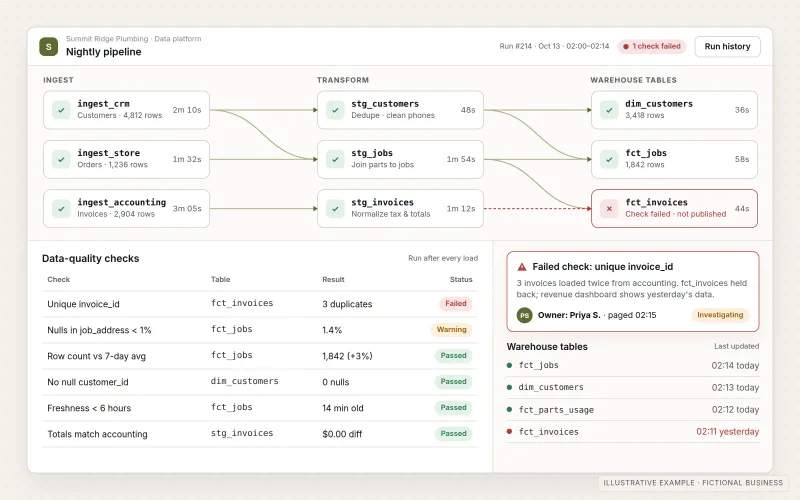
What IOPIA provides
What the work includes
- 01
Source and requirements review
The systems that hold the data, how each one can be accessed, how often it changes and what the data will be used for.
- 02
Ingestion pipelines
Scheduled loads from CRMs, stores, accounting, ad platforms, files and APIs into one central location.
- 03
Transformation and data model
Raw records cleaned, joined and modeled into clear tables — customers, orders, invoices — using definitions agreed with your team.
- 04
Data-quality checks
Automated tests for missing values, duplicates, unexpected totals and late data, run every time the pipeline does.
- 05
Orchestration, monitoring and alerts
Jobs run in the right order, retries handle temporary failures, and a named person is alerted when a load or check fails.
- 06
Documentation and lineage
A written record of each table, where its data comes from and how it is transformed, so figures can be traced back to source.
Problems solved
When this helps
- Monthly reporting starts with exporting files from five systems and combining them by hand.
- Dashboards show different totals from the source systems, and nobody can explain why.
- A scheduled export broke weeks ago and reports have quietly been running on old data.
- Data lives in spreadsheets on individual laptops, so analysis depends on who is in the office.
Who it's for
- Businesses whose data is spread across several cloud applications and spreadsheets
- Teams that want dashboards, analysis or machine learning on a dependable data foundation
- Businesses whose existing reporting scripts or exports are fragile and undocumented
A good fit when data needs to come together from more than one system on a regular schedule and be trusted by the people who use it.
Not the right service when the need is a single move of records from an old system into a new one — see Data Migration — or when the data is already in one place and the goal is the charts and reports themselves, which is Dashboards & Business Reporting.
How it works
A monitored data foundation
Select a part of the diagram to see what it does.
- Data is pulled on a schedule from the CRM, store, accounting system, files and other APIs.
- Ingestion loads it into a central cloud database or warehouse.
- Transformations clean and model it into consistent tables, and quality checks run on every load.
- Dashboards, reports and models read from those tested tables.
- If a load or check fails, monitoring alerts a named person before the reports are relied on.
Scope
Included, and not included
Included
- Source system review and access setup using credentials your business authorizes
- Cloud database or data warehouse design and setup
- Scheduled ingestion from applications, files and APIs
- Transformation and modeling into documented, consistent tables
- Automated data-quality tests on every run
- Orchestration, logging, failure alerts and retries
- Documentation of tables, definitions and lineage
- Pipeline monitoring and maintenance as a managed option
Not included
- The dashboards and reports themselves, which belong to Dashboards & Business Reporting
- One-time moves from a retiring system, which are scoped as Data Migration
- Fixing data-entry habits inside source systems; IOPIA can flag recurring issues for your team
- Third-party database, warehouse or tool subscription costs unless covered by a disclosed, agreed IOPIA-managed arrangement; provider, usage and administration charges are identified separately
Not sure where your project sits? Contact us about scope — we'll say plainly what fits.
Implementation
How implementation works
Discover
List the sources, the questions the data must answer and how fresh it needs to be.
Design
Choose the storage, agree the data model and definitions, and plan the load schedule.
Build
Create ingestion, transformation and quality checks, starting with the most important source.
Verify
Reconcile totals against the source systems and review the results with your team.
Operate
Run on schedule with monitoring and alerts, and adapt when a source system changes.
- Project — a one-time implementation with a defined scope.
- Managed — a recurring service after launch.
- Custom — larger work that starts with discovery.
Technologies
Platforms that may be involved
Storage and tooling are chosen to suit the data volume and the team. A project may use:
- Cloud databases such as PostgreSQL, or warehouses such as BigQuery, Snowflake or Azure SQL
- SQL and Python for transformation, often with a modeling tool such as dbt
- Vendor APIs and built-in exports from the systems you already use
- Scheduled cloud jobs or an orchestration tool to run pipelines in order
- Logging and alerting through email, Microsoft Teams or Slack
Platform names are used to describe the work. They do not indicate a partnership or certification.
Questions
- Do we need a data warehouse?
- Not always. If reporting draws on one or two systems a dashboard tool can read directly, a warehouse may be unnecessary. Once several sources need combining, cleaning or keeping as history, a central database usually pays for its upkeep in reliability.
- How is this different from data migration?
- Data migration is a one-time move from an old system to a new one, finished at cut-over. Data engineering is ongoing: pipelines that run on a schedule, with checks and monitoring, for as long as the business uses the data.
Discuss Data Engineering with IOPIA.
Describe the project or problem in your own words. Early-stage conversations are welcome — you don't need a finished brief.