
Business dashboards and reporting
One place to see the numbers that run the business, with each figure defined once and refreshed from the systems it comes from.
Contact us about this serviceWhat it looks like
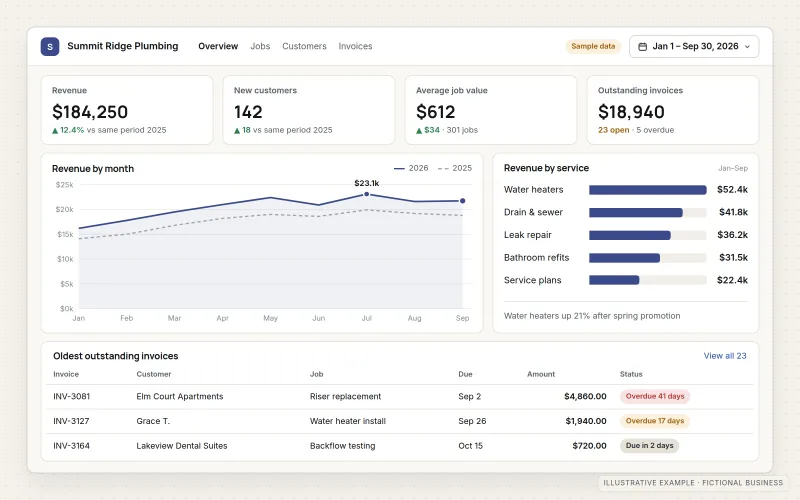
An example of the finished work
What IOPIA provides
What the work includes
- 01
Metric definitions
A short written glossary: what counts as a lead, a sale, revenue or a returning customer, and which system each number comes from.
- 02
Data source connections
Read access to the CRM, store, accounting, advertising or analytics systems the reports draw from.
- 03
Reporting model
Data combined and cleaned so figures from different systems line up by date, customer, product or location.
- 04
Dashboards by role
Focused views for the owner, sales, marketing or operations, each answering a defined set of questions.
- 05
Scheduled summaries
A regular email or shared report for people who need the headline numbers but won't open a dashboard.
- 06
Access and documentation
Who can see which reports, how often the data refreshes and how each chart is calculated.
Problems solved
When this helps
- Monthly numbers are assembled by hand from exports, and the process takes most of a day.
- Sales, marketing and finance each report a different figure for the same thing.
- Advertising spend is visible, but nobody can see which campaigns turned into paying customers.
- Decisions are made on last quarter's spreadsheet because current data is hard to get.
Who it's for
- Owners who want a weekly view of sales, pipeline and cash without building spreadsheets
- Marketing teams that need spend connected to leads and revenue
- Operations managers tracking volumes, turnaround or capacity across systems
A good fit when the data already exists in business systems, the questions are known, and people will make decisions from the answers.
Not the right service when the underlying data isn't connected or is spread across systems that need consolidating first — start with Data Engineering — or when tracking itself is missing on the website, which is Conversion Tracking.
How it works
From scattered systems to one view
Select a part of the diagram to see what it does.
- Leads and deals come from the CRM, spend and clicks from the ad platforms, and invoices and payments from accounting.
- The reporting model combines these sources and applies the metric definitions agreed with the business.
- A dashboard shows each role the figures it needs, refreshed on a set schedule.
- A weekly summary sends the headline numbers to people who don't use the dashboard.
Scope
Included, and not included
Included
- Workshop to agree the questions, audiences and metric definitions
- Connections to existing data sources
- Data cleaning and combination for reporting
- Dashboard design and build for agreed roles
- Scheduled email or shared summaries
- Access permissions and refresh schedule
- Documentation and optional ongoing changes as a managed service
Not included
- Fixing data quality inside source systems beyond what reporting can account for
- Setting up website or ad conversion tracking — see Conversion Tracking
- Financial forecasting, accounting advice or audited figures
- Reporting tool license costs, unless the agreement includes a tool IOPIA provides
Not sure where your project sits? Contact us about scope — we'll say plainly what fits.
Implementation
How implementation works
Ask the questions
List the decisions the reports should support and the numbers each one needs.
Define the metrics
Write down each definition and its source, and settle disagreements before building.
Connect and model
Connect the sources and shape the data so figures from different systems agree.
Build and check
Build the dashboards, then reconcile key totals against the source systems with you.
Adopt and adjust
Set up scheduled summaries, train the people using them and add views as questions change.
- Project — a one-time implementation with a defined scope.
- Managed — a recurring service after launch.
Technologies
Platforms that may be involved
The reporting tool is chosen to fit your systems and budget. Options include:
- Microsoft Power BI
- Looker Studio
- Spreadsheet-based reporting in Excel or Google Sheets for smaller needs
- Connectors to CRMs, Shopify, QuickBooks, Google Ads, Meta Ads and Google Analytics
- A cloud database for combining sources when direct connections are not enough
Platform names are used to describe the work. They do not indicate a partnership or certification.
Questions
- Why do our reports disagree with each other today?
- Usually because each system counts things differently — a CRM may count a deal when it's created, accounting when it's paid. Agreeing definitions in writing is the first step, before any dashboard is built.
- Do we need a data warehouse?
- Often not. Many small and mid-sized businesses can report directly from their systems. A separate database is suggested only when sources are too many, too large or too slow to query directly.
- Where do the dashboards run?
- Either in a reporting tool account set up for the business or on reporting infrastructure IOPIA operates. Where IOPIA's tools are used, this is disclosed and agreed, and the agreement sets out how the business's data and reports are exported or handed over when the engagement ends.
Discuss Dashboards & Business Reporting with IOPIA.
Describe the project or problem in your own words. Early-stage conversations are welcome — you don't need a finished brief.