
Web & Software DevelopmentApplications & Business Software
Mobile app development
iOS and Android apps for customers or staff, built to work with the systems and records the business already has.
Contact us about this serviceWhat it looks like
An example of the finished work
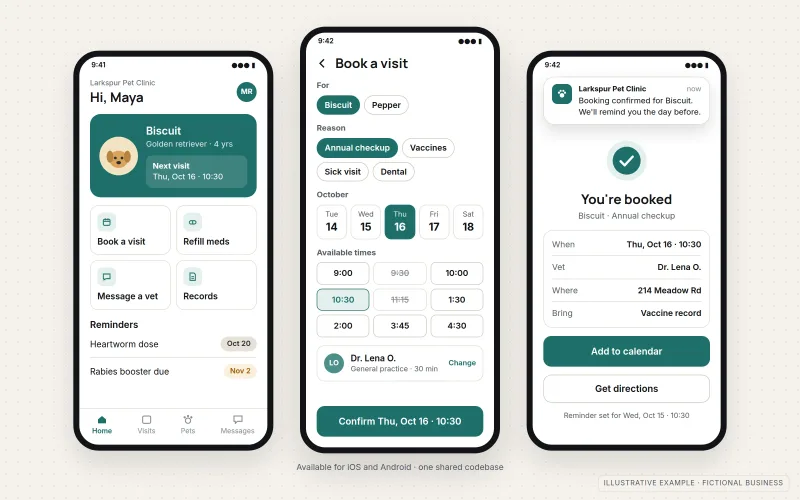
What IOPIA provides
What the work includes
- 01
App design and user flows
Phone-first screens and flows based on each user's tasks, reviewed as a clickable prototype.
- 02
Cross-platform build
One shared codebase for iOS and Android, with the cross-platform framework chosen for the project — React Native or Flutter, for example — and native modules where a feature requires them.
- 03
Backend and admin connections
An API for accounts, rules and records, connected to existing systems and an admin view for staff.
- 04
Device features
Camera, location, push notifications or offline storage, used only where the app genuinely needs them.
- 05
Testing on real devices
Testing on physical iPhones and Android phones, plus beta releases through TestFlight and Google Play testing tracks.
- 06
Store submission and updates
Listings, builds and review submissions prepared under the business's own developer accounts, followed by maintenance releases for new operating system versions.
Problems solved
When this helps
- Staff in the field fill in paper forms or message photos that someone later re-enters by hand.
- Customers expect an app for a service they use often, and a mobile website feels like a workaround.
- The task depends on the camera, location or notifications in ways a browser handles poorly.
- An existing app was built by a developer who has moved on, and it no longer builds for current iOS or Android versions.
Who it's for
- Businesses whose customers use a service often enough to keep an app on their phone
- Teams with field or mobile staff who need to capture information, photos or locations on the move
- Founders who need a first mobile version of a product to test with real users
A good fit when the app will be used regularly on phones and depends on features or an installed experience that a browser cannot provide well.
If the software can run in a browser, including as an installable progressive web app, Web Application Development is usually simpler to build and maintain. If customers only need to check status, documents and invoices, Customer Portals is the closer fit. Internal operations systems used mainly at a desk belong to Custom Business Software.
How it works
How a mobile app connects to the business
Select a part of the diagram to see what it does.
- The app is published through the Apple App Store and Google Play under the business's own developer accounts.
- Customers or staff install it and sign in, using device features such as the camera or notifications where needed.
- The app sends and receives information through a backend API, which checks accounts and business rules.
- The backend exchanges data with existing systems such as the CRM or billing system, so records are not kept twice.
Scope
Included, and not included
Included
- Requirements, user roles and mobile user flows
- Interface design and clickable prototype
- Cross-platform iOS and Android app, with native modules where needed
- Fully native builds where the requirements call for them, scoped case by case
- Backend API, data storage and admin view, or connection to existing systems
- Device features such as camera, location and push notifications
- Testing on real devices and beta distribution
- App store listing preparation, submission and maintenance releases
Not included
- Guaranteed approval by the Apple App Store or Google Play — review decisions belong to the stores
- Games, augmented reality or apps built around custom hardware
- Promises of downloads, ratings or store rankings
- Store developer account fees, paid by the business to Apple and Google
Not sure where your project sits? Contact us about scope — we'll say plainly what fits.
Implementation
How implementation works
Define users and tasks
Agree who uses the app, what they need to do on a phone and what the first version includes.
Prototype the flows
Click through the main screens on a phone and adjust them with the people who will use the app.
Build app and backend
Develop the app and backend in increments, with test builds on real devices.
Beta and submit
Run a beta with a small group, fix what they find, then submit to both stores under the business's accounts.
Maintain
Release fixes and keep the app working as new iOS and Android versions arrive.
- Project — a one-time implementation with a defined scope.
- Managed — a recurring service after launch.
- Custom — larger work that starts with discovery.
Technologies
Platforms that may be involved
The approach is chosen to suit the app and who will maintain it. It may include:
- Cross-platform frameworks such as React Native or Flutter
- Swift for iOS and Kotlin for Android where native code is needed
- TypeScript or Node.js backend APIs and relational databases such as PostgreSQL
- Push notification services from Apple, Google or Firebase
- Apple App Store Connect, TestFlight and the Google Play Console
Platform names are used to describe the work. They do not indicate a partnership or certification.
Questions
- Do we need a native app, or will a web app do?
- If the task works well in a browser, a web application or progressive web app is usually simpler to build and maintain. A store app makes sense when users open it often, rely on device features or expect to find it in the app stores.
- Who owns the app store listing?
- The business does. Apps are published under the business's own Apple and Google developer accounts, so the listing, reviews and users stay with the business. IOPIA is given access to prepare and submit builds.
- Which framework do you use?
- It depends on the project. Apps are built cross-platform for iOS and Android, and the framework — React Native or Flutter, for example — is chosen for the features the app needs, the existing systems it connects to and who will maintain it.
- Can you guarantee the app will be approved?
- No. Apple and Google make their own review decisions. Apps are prepared against the stores' published guidelines, and review feedback is addressed before resubmitting.
Discuss Mobile App Development with IOPIA.
Describe the project or problem in your own words. Early-stage conversations are welcome — you don't need a finished brief.