
Business SolutionsCRM, ERP, Booking & Payments
ERP assessment, selection and planning
A clear picture of how your orders, inventory, purchasing and finance work today, a shortlist of ERP options measured against your requirements, and a phased plan — before anything is bought.
Contact us about this serviceWhat it looks like
An example of the finished work
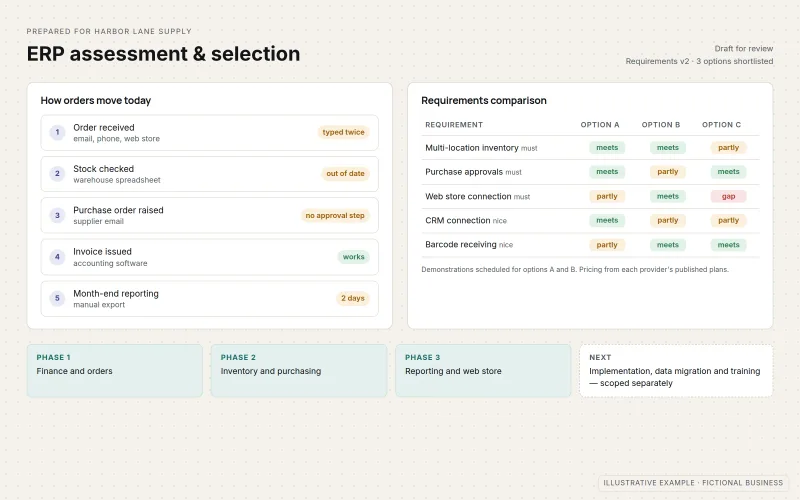
What IOPIA provides
What the work includes
- 01
Process and requirements assessment
How orders, purchasing, inventory, invoicing and reporting work today, where information is typed in twice and which requirements are essential.
- 02
ERP fit check
Whether the business needs an ERP at all, or whether accounting software, a CRM or a few connected applications would cover the need.
- 03
Option comparison and selection support
A shortlist of platforms compared against the agreed requirements, published costs and integration needs, with vendor demonstrations you attend.
- 04
Phased implementation plan
Which modules come first, what data moves, which systems connect, who is involved and which decisions are still open.
- 05
Separately scoped next steps
Configuration, integrations, data migration, training and ongoing support are agreed in their own scope after selection, where they are offered for the chosen platform.
Problems solved
When this helps
- Orders, stock and invoices live in separate spreadsheets and tools that don't agree.
- The same order is typed into several places, and the mistakes surface at month end.
- The business has outgrown its accounting software, and nobody is sure what should replace it.
- Vendors are proposing ERP systems, and it's unclear which one fits — or whether one is needed at all.
Who it's for
- Businesses whose finance, inventory, purchasing or order processes have outgrown spreadsheets and basic tools
- Teams evaluating ERP platforms who want a requirements-led comparison before committing
- Businesses that have chosen an ERP and need a plan for rollout, data and connections to other systems
A good fit when several core processes — finance, orders, inventory or purchasing — need to work from one shared record.
If the main need is tracking leads and customers, start with CRM Setup & Integration; if only a few existing tools need to share data, see API & System Integration; if no packaged platform fits the process, Custom Business Software builds one.
How it works
From process map to ERP plan
Select a part of the diagram to see what it does.
- Current processes for orders, inventory, purchasing and finance are mapped with the people who run them.
- Existing systems and the data they hold are listed, including what must connect or carry over.
- Requirements are agreed and prioritized before any platform is discussed.
- A shortlist of options is compared against those requirements, with demonstrations you attend.
- A phased plan sets out modules, data migration, integrations and training.
- Implementation work is scoped separately once a platform is selected.
Scope
Included, and not included
Included
- Workshops mapping current processes: orders, purchasing, inventory, invoicing and reporting
- A written requirements list with must-haves and nice-to-haves
- An assessment of whether an ERP, accounting software or connected applications fit best
- A shortlist and side-by-side comparison of platforms against the requirements
- Preparation for vendor demonstrations and review of the proposals you receive
- A phased plan covering modules, data migration, integrations and training needs
Not included
- Configuration, integrations, data migration, training and ongoing support — each agreed in its own scope after selection, where offered for the chosen platform
- ERP licences and subscriptions, billed by the provider or passed through as set out in the agreement
- Accounting, tax, audit or legal advice — your accountant or adviser remains responsible for these
- Building a bespoke ERP system, which is scoped as Custom Business Software
- Guaranteed savings, timelines or results from any platform
Not sure where your project sits? Contact us about scope — we'll say plainly what fits.
Implementation
How implementation works
Discover
Talk to the people who run orders, stock, purchasing and finance, and map how work moves between them.
Define requirements
Agree must-have and nice-to-have requirements, the systems that must connect and the data that must carry over.
Compare options
Shortlist platforms, prepare demonstrations and compare them against the requirements and published costs.
Plan
Write a phased plan for modules, data migration, integrations, training and the decisions that remain.
Scope next steps
Agree which implementation work follows, who delivers it and how it is scoped and accepted.
- Project — a one-time implementation with a defined scope.
- Custom — larger work that starts with discovery.
Technologies
Platforms that may be involved
The platform is chosen for each business from its requirements, size and existing systems; there is no single ERP used for every business. Examples of platforms that may be compared — not partnerships, certifications or implementation claims:
- Microsoft Dynamics 365 Business Central
- Oracle NetSuite
- SAP Business One
- Odoo
- Acumatica
- Accounting platforms such as QuickBooks Online or Xero, when an ERP isn't needed yet
Platform names are used to describe the work. They do not indicate a partnership or certification.
Questions
- Do we need an ERP, or would accounting software and a CRM be enough?
- It depends on how many core processes need to share one record and how complex your inventory, purchasing or finance are. The assessment answers this first; concluding that you don't need an ERP yet is a valid outcome.
- How is an ERP different from a CRM or custom software?
- A CRM tracks leads, customers and deals. An ERP runs the operational and financial side — orders, inventory, purchasing and accounting — from one database. Custom software is built when no packaged platform fits a process. Many businesses use an ERP and a CRM together, connected by an integration.
- Which ERP platform do you implement?
- IOPIA doesn't start from a preferred platform and claims no vendor partnerships. Options are compared against your requirements. Whether configuration and rollout are then delivered by IOPIA, the vendor or the vendor's implementation partner depends on the platform chosen, and is agreed in its own scope.
Discuss ERP Solutions with IOPIA.
Describe the project or problem in your own words. Early-stage conversations are welcome — you don't need a finished brief.