
AI, Automation & DataData Engineering
Data migration between business systems
Moving your records safely from an old system to a new one — cleaned, mapped, rehearsed and checked — so the switch happens once and nothing goes missing along the way.
Contact us about this serviceWhat it looks like
An example of the finished work
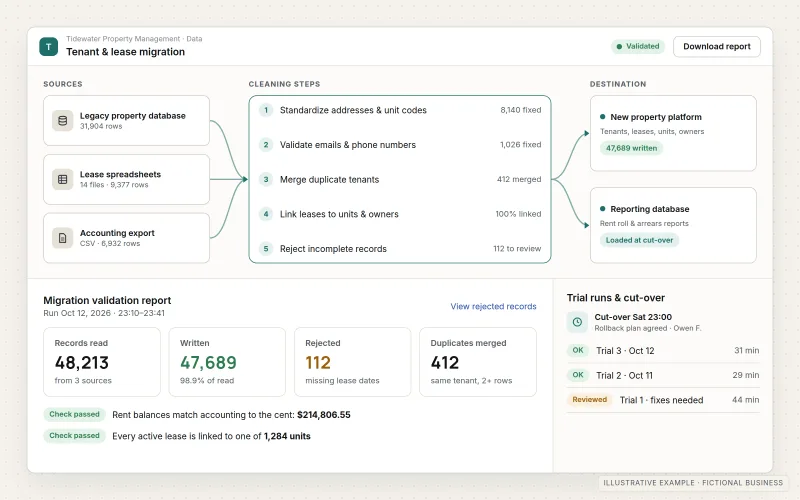
What IOPIA provides
What the work includes
- 01
Data audit
What data exists, how much of it, how clean it is and which records are worth moving.
- 02
Migration plan
Field mapping, cleaning rules, the order records move in, the cut-over approach and a rollback plan.
- 03
Cleaning and de-duplication
Duplicates merged, formats standardized and obviously broken records set aside for your decision.
- 04
Trial migration
A full test run into a sandbox or copy, checked with your team before the real move.
- 05
Cut-over
The final move run at an agreed point, with the original data kept untouched and people switched to the new system.
- 06
Validation report
Record counts, totals and exceptions compared between source and destination, written down for sign-off.
Problems solved
When this helps
- The business is moving to a new CRM or accounting system and is worried about losing history.
- Years of customer data contain duplicates, old formats and half-finished records.
- The new system's import tool rejects files without explaining which rows failed or why.
- A previous migration left records missing, and nobody can say exactly which ones.
Who it's for
- Businesses replacing a CRM, accounting, e-commerce or job-management system
- Teams consolidating several spreadsheets or databases into one system
- Businesses retiring an old system that still holds history they need to keep
A good fit when the data lives in systems the business already owns or licenses, there is a clear destination, and the move happens once.
Not the right service when data needs to flow on a schedule into a reporting database or warehouse — see Data Engineering — or when records must stay continuously in sync between live systems, which is API & System Integration.
How it works
A checked one-time data move
Select a part of the diagram to see what it does.
- Records are exported from the old system, which stays untouched throughout.
- A mapping plan sets how each field is cleaned, de-duplicated and transformed.
- A trial migration into a test copy lets your team check the result and spot problems.
- At the agreed cut-over point, the final move runs with a rollback plan ready.
- A validation report compares counts and totals between old and new systems and lists any exceptions for sign-off.
Scope
Included, and not included
Included
- Source data audit and profiling
- Field mapping and transformation rules
- Data cleaning, standardization and de-duplication
- Decisions recorded on what moves, what is archived and what is left behind
- Trial migration into a test copy, with your review
- Production cut-over with an agreed rollback plan
- Validation counts, exception lists and documentation
Not included
- Ongoing scheduled pipelines after the move, which belong to Data Engineering
- Collecting data from third-party websites — see Web Scraping & Data Collection
- Recovering data from failed or corrupted hardware — see Backup & Disaster Recovery for prevention
- Deciding retention or deletion policy on your behalf; IOPIA can flag records for your decision
Not sure where your project sits? Contact us about scope — we'll say plainly what fits.
Implementation
How implementation works
Audit
Profile the source data: volume, quality, duplicates and the fields that actually get used.
Map and plan
Agree mapping, cleaning rules, what is left behind and how to roll back if needed.
Trial run
Migrate into a test copy, compare counts and let your team spot problems.
Cut over
Run the final move at an agreed point, verify it and switch people to the new system.
Sign off
Review the validation report, resolve exceptions and archive the old system's data as agreed.
- Project — a one-time implementation with a defined scope.
- Custom — larger work that starts with discovery.
Technologies
Platforms that may be involved
Tools depend on where the data is and where it's going. A migration may use:
- Built-in import and export tools in your old and new systems
- Vendor APIs for systems without bulk import
- Python or SQL scripts for cleaning and transformation
- A temporary cloud database such as PostgreSQL for staging and comparison
- Spreadsheet exception lists for your team to review
Platform names are used to describe the work. They do not indicate a partnership or certification.
Questions
- Will everything from the old system come across?
- Not always, and that's often a good thing. Some data is obsolete or doesn't fit the new system's structure. The plan lists what moves, what is archived and what is left behind, and you approve it before the migration runs.
- What if something goes wrong during the move?
- A trial run happens first, the original data is kept untouched, and a rollback plan is agreed in advance. The validation report shows exactly which records, if any, need attention.
- What if we need data to keep flowing after the move?
- That becomes ongoing infrastructure rather than a migration. Scheduled pipelines into a reporting database or warehouse are covered by Data Engineering, and can be planned alongside the migration.
Discuss Data Migration with IOPIA.
Describe the project or problem in your own words. Early-stage conversations are welcome — you don't need a finished brief.