
Technology consulting and planning
A clear view of the systems you have today and a written, prioritized plan for what to change next.
Contact us about this serviceWhat it looks like
An example of the finished work
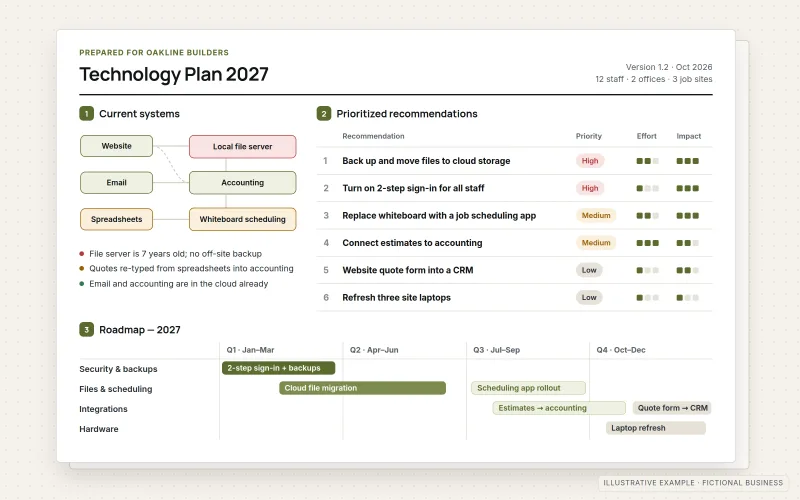
What IOPIA provides
What the work includes
- 01
Systems inventory
A list of the tools, subscriptions, accounts and data the business depends on, including who owns each one.
- 02
Assessment
An honest review of what works, what overlaps, what is at risk and where staff lose time to workarounds.
- 03
Written technology plan
A roadmap in plain language that explains each recommendation, why it matters and what it depends on.
- 04
Prioritization
Recommendations ranked by impact, effort and risk, so the business knows what to do first and what can wait.
- 05
Tool selection support
Requirements written down and a short list of options compared against them before anything is purchased.
- 06
Review sessions
Follow-up conversations to revisit the plan as the business changes or as items are completed.
Problems solved
When this helps
- The business pays for many subscriptions and nobody is sure which ones are still used.
- Software decisions are made product by product, without a written list of what the business actually needs.
- Important systems depend on one person's knowledge or one person's login.
- There is a long list of technology ideas but no agreed order for tackling them.
Who it's for
- Owners and managers who want a plan before spending on new software
- Growing businesses whose tools were added one at a time without a plan
- Organizations preparing for a change such as new staff, a new service line or a system replacement
A good fit when the business needs clarity and priorities before committing to a specific project.
If the need is already clear, such as moving email or building a website, go straight to that service; ongoing day-to-day support is covered by Managed IT Services.
How it works
From current systems to a plan
Select a part of the diagram to see what it does.
- The starting point is an inventory of the tools, subscriptions and accounts the business already uses.
- An assessment identifies what works, where tools overlap, where risks sit and where people rely on workarounds.
- Those findings become a written technology plan that explains each recommendation in plain language.
- The plan ranks recommendations so the business knows what to tackle first and what can wait.
- Where new tools are needed, requirements from the plan guide a comparison of options before anything is bought.
Scope
Included, and not included
Included
- Interviews with the owner and key staff, held remotely
- Inventory of software, subscriptions, accounts and data locations
- Review of access, ownership and single points of failure
- Assessment of overlaps, gaps and manual workarounds
- A written technology plan with prioritized recommendations
- Requirements and comparison support for tool or vendor selection
- A walkthrough of the plan and follow-up review sessions
Not included
- Implementation of the recommendations, which is scoped as separate services
- Purchasing or reselling software on the business's behalf
- Formal security audits or compliance assessments
- Legal, financial or tax advice
Not sure where your project sits? Contact us about scope — we'll say plainly what fits.
Implementation
How implementation works
Listen
Understand the business, its goals and the problems people notice day to day.
Inventory
Record every system, subscription and account, along with who owns and uses it.
Assess
Identify what works, what is redundant, what is risky and what is missing.
Plan
Write the roadmap, rank recommendations by impact and effort, and note the dependencies between them.
Review
Walk through the plan together, answer questions and agree on the first steps.
- Project — a one-time implementation with a defined scope.
- Custom — larger work that starts with discovery.
Technologies
Platforms that may be involved
Assessments typically cover areas such as:
- Email and collaboration suites such as Microsoft 365 and Google Workspace
- CRM, booking and payment tools
- Websites, hosting and domains
- Accounting and line-of-business software
- File storage, backups and account access
Platform names are used to describe the work. They do not indicate a partnership or certification.
Questions
- Do we have to hire IOPIA to carry out the plan?
- No. The plan is written so that any capable provider, or your own staff, can act on it. IOPIA can implement parts of it if you choose, as separate work.
- Can you help us choose between software vendors?
- Yes. IOPIA helps write down what the business needs, then compares a short list of options against those requirements, including cost, fit and how each would connect to your existing systems. The final choice is yours.
Discuss Technology Consulting & Planning with IOPIA.
Describe the project or problem in your own words. Early-stage conversations are welcome — you don't need a finished brief.