
Business SolutionsCRM, ERP, Booking & Payments
Online payments and Stripe integration
Taking card payments, invoices and subscriptions online, with each payment updating the other systems your business runs on.
Contact us about this serviceWhat it looks like
An example of the finished work
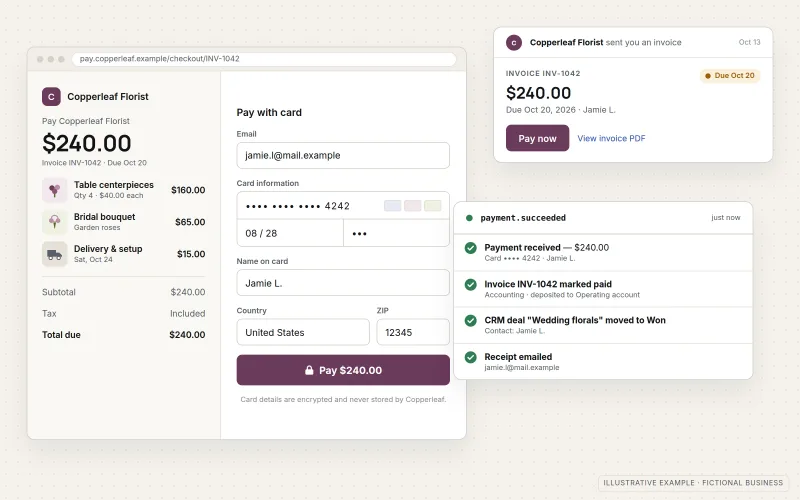
What IOPIA provides
What the work includes
- 01
Hosted checkout
Stripe Checkout or Payment Links added to your website, so customers pay on a page hosted by the payment provider.
- 02
Invoices
Online invoices with a pay-now link, sent from Stripe or from tools connected to it.
- 03
Subscriptions
Recurring plans, trial periods and a customer portal for updating cards or canceling, where the business offers them.
- 04
Receipts and emails
Payment receipts and failed-payment notices branded and configured so customers know what happened.
- 05
Webhook connections
Payment events sent to your CRM, accounting software or application so records update without retyping.
- 06
Testing and handover
Every payment path tested in Stripe's test mode before going live, with notes on where to find payouts and refunds.
Problems solved
When this helps
- Customers are asked to call in card numbers or mail checks.
- Invoices are created by hand and someone has to chase every unpaid one.
- Payments arrive in Stripe, but the CRM and the books are updated manually, if at all.
- A subscription or deposit was set up quickly and nobody knows what happens when a card fails.
Who it's for
- Service businesses that want to take deposits, invoices or retainers online
- Businesses selling a small number of products, plans or memberships
- Teams already using Stripe whose payments aren't connected to anything else
A good fit when the business has clear prices or invoices and needs a dependable way to collect payment and record it everywhere it matters.
Businesses that need a full online store with a product catalog, cart and inventory should start with E-commerce Development.
How it works
How a payment reaches your systems
Select a part of the diagram to see what it does.
- The customer clicks a payment button or invoice link on your website or in an email.
- They enter card details on a checkout page hosted by the payment provider, so those details never pass through the business's own servers.
- Stripe processes the payment and emails the customer a receipt.
- Stripe then sends a webhook event describing what happened, such as a successful payment, refund or failed renewal.
- Your CRM and accounting tools receive that event and update the customer record and books automatically.
Scope
Included, and not included
Included
- Guidance through creating or reviewing the business's own Stripe account
- Products, prices and tax-rate settings entered as the business specifies
- Stripe Checkout and Payment Links on the website
- Invoice templates and payment reminders
- Subscriptions, trials and the Stripe customer portal
- Webhook handling to update CRM, accounting or application records
- Receipt and notification email settings
- Test-mode verification of each payment path before launch
Not included
- Merchant accounts or payment processing, which are provided by Stripe under its own terms
- Financial, tax or legal advice, including which taxes to charge
- Holding, transferring or handling customer funds
- Collecting or storing card details on the business's own servers
Not sure where your project sits? Contact us about scope — we'll say plainly what fits.
Implementation
How implementation works
Define
Agree what is being sold, how it is priced and which systems need to know when someone pays.
Set up the account
Guide account creation or review, then configure products, prices and customer emails.
Build payment paths
Add Checkout, Payment Links, invoices or subscriptions where customers will use them.
Connect
Set up webhooks that pass successful payments, refunds and failures to your CRM and accounting tools.
Test and launch
Run every path in test mode, including failed cards and refunds, then switch to live payments.
- Project — a one-time implementation with a defined scope.
- Managed — a recurring service after launch.
Technologies
Platforms that may be involved
This service centers on Stripe and commonly connects it to:
- Stripe Checkout and Payment Links
- Stripe Invoicing and Stripe Billing
- Stripe customer portal
- CRM platforms such as HubSpot and Zoho CRM
- Accounting software such as QuickBooks Online and Xero
Platform names are used to describe the work. They do not indicate a partnership or certification.
Questions
- Does card information pass through our website?
- No. With Stripe Checkout, Payment Links and hosted invoices, customers enter card details on pages hosted by Stripe. Your website only links to those pages and receives confirmation afterward.
- Do you provide the merchant account or advise on taxes?
- No. The Stripe account belongs to the business and Stripe processes the payments under its own terms. IOPIA configures what you specify, and questions about which taxes to charge or how to record revenue belong with your accountant or tax adviser.
- Can you connect Stripe to the tools we already use?
- Usually, yes. Many CRM and accounting tools have built-in Stripe connections, and where they don't, a small webhook handler can pass payment events to them.
Discuss Online Payments & Stripe Integration with IOPIA.
Describe the project or problem in your own words. Early-stage conversations are welcome — you don't need a finished brief.