
Identity and access security
Controlling who can sign in to your business systems, how they prove who they are, and how access is granted and removed.
Contact us about this serviceWhat it looks like
An example of the finished work
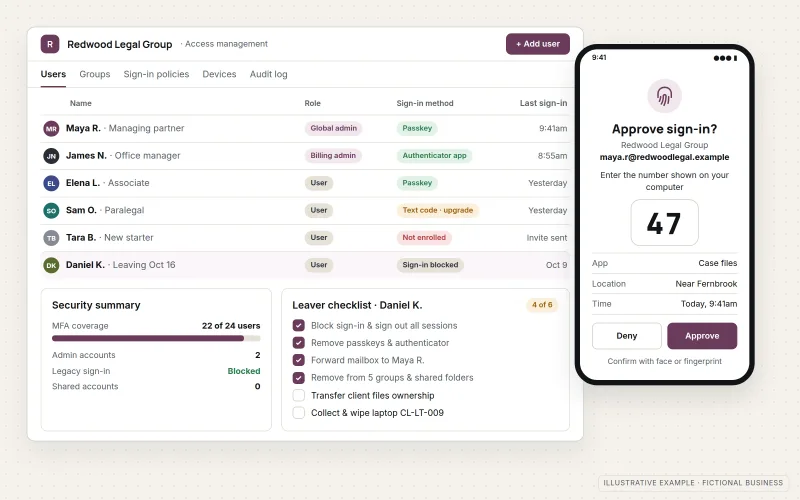
What IOPIA provides
What the work includes
- 01
Account inventory
A list of the accounts across business systems, who uses each and who administers it.
- 02
Multi-factor authentication
MFA enabled for users and administrators, with phishing-resistant methods where supported.
- 03
Administrator separation
Everyday accounts separated from administrator roles, with fewer people holding full access.
- 04
Sign-in policies
Sign-in and sharing settings configured in Microsoft Entra ID and other platforms.
- 05
Joiner and leaver process
A written process for granting access to new staff and removing it promptly when people leave.
- 06
Access review
Periodic checks that access still matches each person's role.
Problems solved
When this helps
- Former employees or contractors may still be able to sign in.
- Several people share one administrator login.
- Multi-factor authentication is enabled for some accounts but not others.
- There is no record of who has access to which system.
Who it's for
- Businesses using Microsoft 365 and other cloud systems
- Businesses that have grown without a plan for accounts and access
- Businesses preparing for a security review by a customer or insurer
A good fit when access to business systems has grown informally and needs to be brought under control.
Formal penetration testing and compliance certification are not part of this service.
How it works
How access is decided
Select a part of the diagram to see what it does.
- A person signs in with their own account — never a shared login.
- They prove their identity with a second factor such as an authenticator app or passkey.
- Sign-in policies check the request against their role.
- Access is granted only to the systems that role allows; administrator roles are held by few people.
Scope
Included, and not included
Included
- Account and administrator inventory
- Multi-factor authentication rollout
- Administrator role separation
- Sign-in and sharing policy configuration
- Joiner and leaver process
- Periodic access reviews as a managed option
Not included
- Penetration testing or compliance certification
- Guarantees that a system cannot be compromised
- Physical security and on-site work
Not sure where your project sits? Contact us about scope — we'll say plainly what fits.
Implementation
How implementation works
Inventory
List accounts, administrators and systems.
Prioritize
Address shared logins, missing MFA and leftover access first.
Configure
Enable MFA, separate admin roles and set sign-in policies.
Document
Write down who has access to what, and the joiner and leaver steps.
Review
Recheck access periodically as part of managed IT.
- Project — a one-time implementation with a defined scope.
- Managed — a recurring service after launch.
Technologies
Platforms that may be involved
Work typically involves:
- Microsoft Entra ID
- Microsoft 365 admin center
- Authenticator apps and passkeys
- Password managers for shared credentials
- Admin settings in the business's other cloud systems
Platform names are used to describe the work. They do not indicate a partnership or certification.
Questions
- Will this make our systems completely secure?
- No system can be made completely secure. Strong identity and access controls remove some of the most common ways business accounts are compromised.
- Is multi-factor authentication difficult for staff?
- Modern methods such as authenticator apps and passkeys add a short step at sign-in. Rollout is planned so staff are set up before it is enforced.
Discuss Identity & Access Security with IOPIA.
Describe the project or problem in your own words. Early-stage conversations are welcome — you don't need a finished brief.