
Web & Software DevelopmentApplications & Business Software
Customer portal development
A secure signed-in area where customers check their own status, documents and invoices instead of emailing or phoning to ask.
Contact us about this serviceWhat it looks like
An example of the finished work
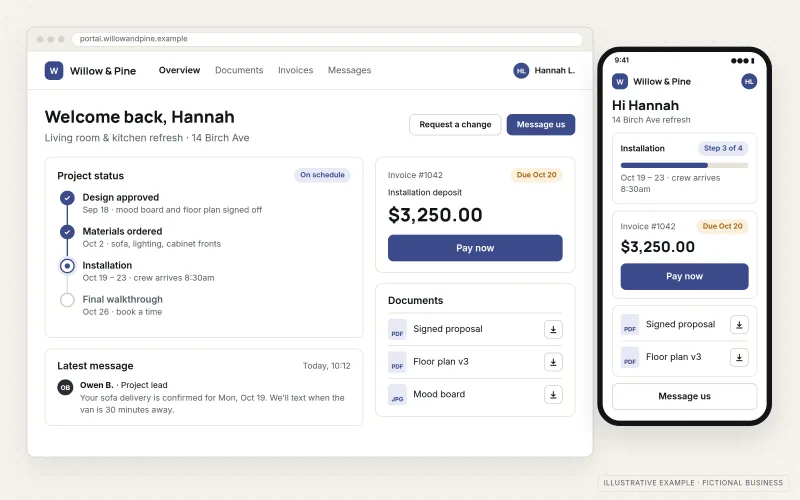
What IOPIA provides
What the work includes
- 01
Customer accounts
Invitation-based sign-up, sign-in, password reset and optional multi-factor authentication for each customer contact.
- 02
Status and history
Pages showing the current state of each order, project, case or job, with dates and recent updates.
- 03
Document exchange
Customers download contracts, reports or certificates and upload the files you need from them, in one place instead of email attachments.
- 04
Invoices and payments
Open and past invoices listed, with an option to pay online through a connected payment processor.
- 05
Requests and messages
Structured request forms that create a record in your system and notify the right person on your team.
- 06
Data connection
Information drawn from your CRM, job or billing system, so staff keep working where they already do.
Problems solved
When this helps
- Staff spend part of every day answering "what's the status?" emails and calls.
- Documents are sent back and forth as email attachments, and the latest version is hard to find.
- Customers ask for copies of invoices and paperwork that already exist in your systems.
- Customer information is shared through links or attachments that anyone could forward.
Who it's for
- Service firms with ongoing client relationships, such as agencies, consultancies and contractors
- Businesses that exchange documents with customers regularly
- Companies whose customers need to check order, project or case status between updates
A good fit when customers repeatedly ask for information the business already holds in a system, and that information can be shown to each customer safely.
If the need is a new product or tool for users who are not existing customers, see Web Application Development. If customers only need to book appointments, Booking & Scheduling Systems is simpler.
How it works
How a customer portal answers its own questions
Select a part of the diagram to see what it does.
- An invited customer signs in, and their account determines which records they are allowed to see.
- The portal shows status, documents and invoices for that customer only.
- That information comes from the CRM, billing or job systems the business already uses, so nothing is maintained twice.
- When the customer uploads a file or submits a request, it is recorded and sent to the right person on your team.
Scope
Included, and not included
Included
- Review of the questions and requests customers send today
- Customer account, invitation and sign-in setup
- Access rules so each customer sees only their own records
- Status, document and invoice pages
- Request forms routed to your team
- Integration with CRM, job, billing or file-storage systems
- Activity logging of sign-ins and document access
Not included
- Replacing the CRM or billing system the portal reads from
- Compliance certification such as HIPAA or SOC 2, or legal advice on data handling
- App-store mobile apps — the portal works in mobile browsers; see Mobile App Development
- Live chat staffing or customer support on your behalf
Not sure where your project sits? Contact us about scope — we'll say plainly what fits.
Implementation
How implementation works
Collect the questions
Review recent customer emails and calls to find the requests a portal could answer or handle.
Trace the data
Identify which system holds each piece of information and how the portal can read it safely through an API or sync.
Set access rules
Decide how customers are invited, which contacts see which accounts and what they are allowed to change.
Build and test with real accounts
Build the portal, then test it against real customer records to confirm no one can see another customer's data.
Invite customers in stages
Open the portal to a small group first, adjust from their feedback, then invite the rest.
- Project — a one-time implementation with a defined scope.
- Managed — a recurring service after launch.
Technologies
Platforms that may be involved
A portal sits on top of existing systems. Depending on the setup, it may involve:
- Web frameworks and a server-side API for the portal itself
- Managed authentication with multi-factor sign-in options
- APIs of CRM, project or billing systems such as HubSpot or QuickBooks
- Cloud file storage for documents
- Stripe for invoice payments
Platform names are used to describe the work. They do not indicate a partnership or certification.
Questions
- Do our staff have to update the portal separately?
- No, as long as those systems can be read through an API or sync. The portal reads from the systems your team already uses, so updating a job or issuing an invoice there is what customers see.
- How do you stop customers seeing each other's information?
- Access is checked on the server for every record, not only hidden in the interface, and this is tested with real accounts before launch.
Discuss Customer Portals with IOPIA.
Describe the project or problem in your own words. Early-stage conversations are welcome — you don't need a finished brief.