
Network design and consulting
An assessment of how your office uses its network, and a clear plan for the layout, Wi-Fi coverage and equipment it needs — priced to the scope of the site.
Contact us about this serviceWhat it looks like
An example of the finished work
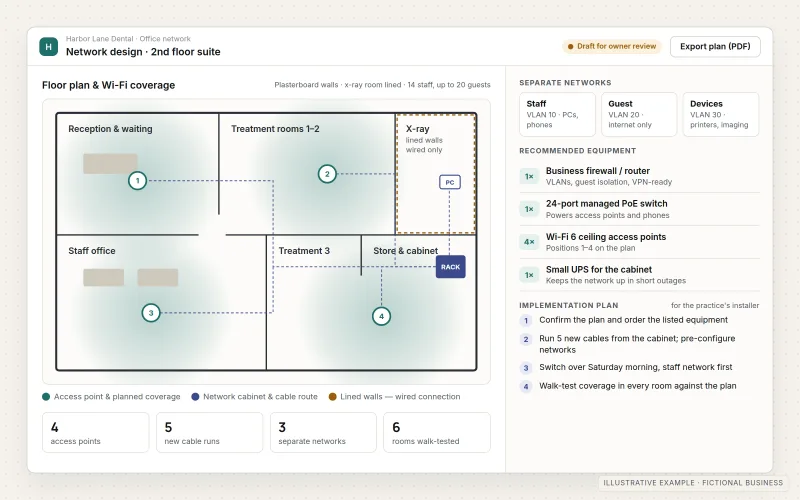
What IOPIA provides
What the work includes
- 01
Needs assessment
A review of the people, devices, rooms and applications the network serves, the current equipment and internet service, and the problems staff run into.
- 02
Network layout
A diagram of how the internet connection, firewall, switches, access points and devices connect, with separate networks for staff, guests and devices such as printers or cameras.
- 03
Wi-Fi coverage plan
Recommended access point positions and quantities based on the floor plan, building materials and how many people use each area.
- 04
Equipment recommendations
A specified list of router or firewall, switches and access points sized to the site, with options at different budgets and the reasons for each choice.
- 05
Implementation plan
The order of work, what can change during business hours, the settings to apply and how to test each step, written for whoever carries it out.
- 06
Handover documentation
The design, addressing, network names and equipment list recorded in one place, so future changes start from an accurate picture.
Problems solved
When this helps
- Wi-Fi drops in some rooms, and nobody is sure whether the answer is more equipment or better placement.
- Staff, guests, printers and cameras all share one network.
- The office is moving or expanding, and the network needs to be planned before the space is fitted out.
- Equipment was added piece by piece over the years, and quotes for replacing it are hard to compare.
Who it's for
- Small and growing offices planning a new network, a move or an expansion
- Businesses with unreliable Wi-Fi or a network that grew without a plan
- Owners who want an independent recommendation before buying equipment or accepting an installation quote
A good fit when a business wants a clear, documented plan for its office network before money is spent on equipment or installation.
Private networks inside a cloud environment, VPNs and office-to-cloud connections are Cloud Networking & Secure Connectivity. Day-to-day support for users and devices is Managed IT Services. Routine on-site installation, cabling or hardware deployment is not part of this service; it may be considered by special request, subject to scope, location and availability.
How it works
From the internet connection to every desk
Select a part of the diagram to see what it does.
- The internet service arrives from the business's provider and enters through a router or firewall.
- The firewall separates staff, guest and device networks and applies the agreed rules between them.
- A core switch distributes the connection to wired devices and powers the Wi-Fi access points.
- Access points are placed from the coverage plan so each area has a reliable signal.
- The design plan records the layout, equipment and settings, so the installation can be checked against it.
Scope
Included, and not included
Included
- Review of requirements, the floor plan and the current network and internet service
- Network layout and segmentation design (staff, guest and device networks)
- Wi-Fi coverage and access point placement plan
- Router or firewall, switch and access point recommendations with budget options
- Addressing, network naming and security settings to apply
- A step-by-step implementation and test plan
- Review of installer quotes against the design, where requested
- Handover documentation
Not included
- Routine on-site installation, cabling or hardware deployment — by special request only, subject to scope, location and availability
- Equipment purchase costs, which are paid by the business to its chosen supplier
- Internet service from the business's connectivity provider
- Electrical work, building alterations or structured cabling certification
- Ongoing device and user support — see Managed IT Services
Not sure where your project sits? Contact us about scope — we'll say plainly what fits.
Implementation
How implementation works
Discover
Talk through how the office works, collect the floor plan, current equipment details and the problems people notice.
Assess
Review the current network and requirements remotely, from the floor plan, photos and equipment details, and agree what the design needs to cover.
Design
Prepare the layout, Wi-Fi plan, network separation and equipment list, with options at different budgets.
Plan the work
Write the implementation and test plan for the business's installer, its own staff or IOPIA where a special request is agreed.
Hand over
Walk through the design and documentation, and answer questions as the plan is carried out.
- Project — a one-time implementation with a defined scope.
- Custom — larger work that starts with discovery.
Technologies
Platforms that may be involved
Recommendations are vendor-neutral and chosen for the site and budget. Names below are examples of equipment categories, not partnerships or certifications. A design may include:
- Business routers and firewalls with separate networks (VLANs) for staff, guests and devices
- Managed switches, including power-over-Ethernet for access points and cameras
- Business Wi-Fi access points managed from a single controller or cloud console
- Wi-Fi coverage planning from the floor plan and building materials
- Network diagrams and an addressing plan kept with the handover documents
Platform names are used to describe the work. They do not indicate a partnership or certification.
Questions
- How is this different from Cloud Networking?
- Cloud Networking & Secure Connectivity designs the private networks inside a cloud environment and the VPN or office-to-cloud connections into them, configured remotely. Network Design & Consulting plans the physical office network: layout, Wi-Fi, switches and router or firewall equipment.
- How much does it cost?
- It is priced to the scope — the size of the site, the number of areas and how much documentation is needed. Describe the office and what isn't working, and IOPIA will propose a scope and price before any work starts.
- Will IOPIA install the equipment?
- The design is written so the business's own installer or staff can carry it out. Installation, cabling and other on-site work may be considered by special request, subject to scope, location and availability; it is not a routine service.
Discuss Network Design & Consulting with IOPIA.
Describe the project or problem in your own words. Early-stage conversations are welcome — you don't need a finished brief.