
AI, Automation & DataAutomation
Document automation
Producing quotes, contracts and letters from templates, reading the key details out of documents you receive, and filing everything in the right place.
Contact us about this serviceWhat it looks like
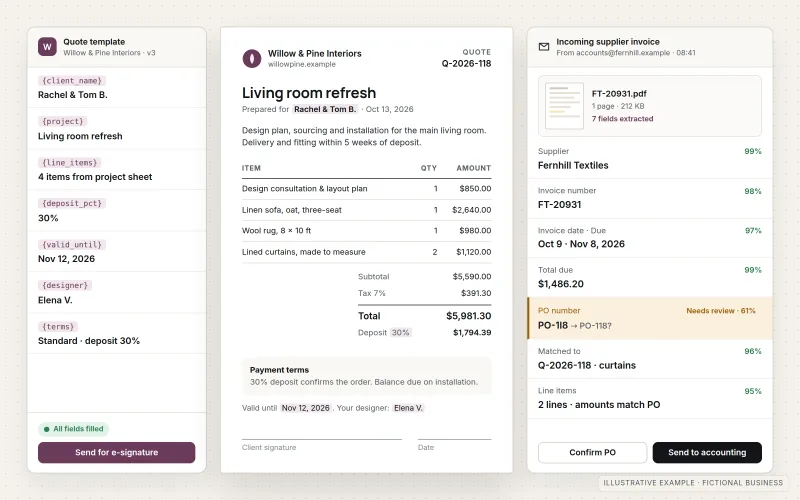
An example of the finished work
What IOPIA provides
What the work includes
- 01
Document inventory
The documents the business creates and receives, how often, where they come from and where they end up.
- 02
Template build
Quotes, proposals, contracts, letters or reports turned into templates with fields filled from your CRM, forms or spreadsheets.
- 03
Field extraction
Key details such as names, dates, totals and reference numbers read from invoices, forms or applications you receive.
- 04
Review queue
Low-confidence or unusual fields flagged for a person to check before anything is saved or sent.
- 05
Routing and filing
Consistent file names, the right folder, and a notification or e-signature request to the right person.
- 06
Template ownership
Templates you can edit yourselves, with notes on which fields are automatic and which are typed in.
Problems solved
When this helps
- Every quote or contract is made by copying an old one and changing details by hand, and mistakes slip through.
- Invoices and forms arrive by email and someone types the totals and dates into another system.
- Signed documents end up in personal inboxes instead of a shared, searchable location.
- Different staff produce the same document in slightly different versions, with outdated terms.
Who it's for
- Businesses that produce many similar quotes, proposals or contracts
- Teams that receive invoices, applications or forms in a consistent format
- Offices where finding the latest signed version of a document takes too long
A good fit when documents follow a recognizable structure, the data to fill them already exists somewhere, and accuracy matters enough to keep a review step.
Not the right service when the documents are a small part of a larger process with approvals and handoffs across systems — see Workflow & Business Process Automation — or when every document is unique and written from scratch.
How it works
Documents in and out
Select a part of the diagram to see what it does.
- Documents arrive from outside, such as invoices or application forms, or need to be created from a template and existing data.
- The document step either reads the agreed fields from a received file or generates a new document.
- Fields the system is unsure about are flagged for a person to check and correct.
- Generated documents are sent to the customer or out for e-signature.
- Every finished document is named consistently and filed in the shared location.
Scope
Included, and not included
Included
- Inventory of documents created and received
- Template design using your existing wording and branding
- Document generation from CRM, form or spreadsheet data
- Extraction of defined fields from received documents, with confidence checks
- Human review step for flagged fields
- Naming, filing and routing rules, including e-signature requests where used
- Testing with real sample documents, documentation and handover
Not included
- Drafting or reviewing legal terms — contract wording stays with you and your advisers
- Perfect reading of handwritten, damaged or highly varied documents; these go to manual review
- Collecting data from third-party websites (web scraping)
- Records-retention policy or compliance certification
Not sure where your project sits? Contact us about scope — we'll say plainly what fits.
Implementation
How implementation works
Collect samples
Gather real examples of each document type, including messy and unusual ones.
Define fields
Agree which fields are filled in, which are read out, and which always need a person.
Build templates and extraction
Create the templates and extraction steps and connect them to your data sources.
Check accuracy
Run the samples through, compare results by hand and tune what gets flagged for review.
Route and file
Switch on naming, filing and notifications, then refine as new document types appear.
- Project — a one-time implementation with a defined scope.
- Managed — a recurring service after launch.
Technologies
Platforms that may be involved
Tools are chosen to fit where your documents already live. A project may involve:
- Microsoft Word, SharePoint and OneDrive, or Google Docs and Google Drive
- Document generation from templates using structured data
- Optical character recognition (OCR) and AI language models for reading defined fields
- E-signature services such as DocuSign or Adobe Acrobat Sign
- Your CRM, forms or spreadsheets as the data source
Platform names are used to describe the work. They do not indicate a partnership or certification.
Questions
- How accurate is reading data from documents?
- It depends on how consistent and legible the documents are. Clean, typed documents in a familiar layout read well; handwriting and unusual layouts don't. That is why uncertain fields are flagged for a person rather than saved automatically.
- Can we still edit the templates ourselves?
- Yes. Templates are built in tools you already use, and the handover notes show which parts are filled automatically so wording can be changed safely.
Discuss Document Automation with IOPIA.
Describe the project or problem in your own words. Early-stage conversations are welcome — you don't need a finished brief.