
Business SolutionsEmail & Collaboration
Google Workspace setup and management
Gmail, Drive, Calendar and Meet on your own domain, with accounts, shared drives and sign-in security organized from the start.
Contact us about this serviceWhat it looks like
An example of the finished work
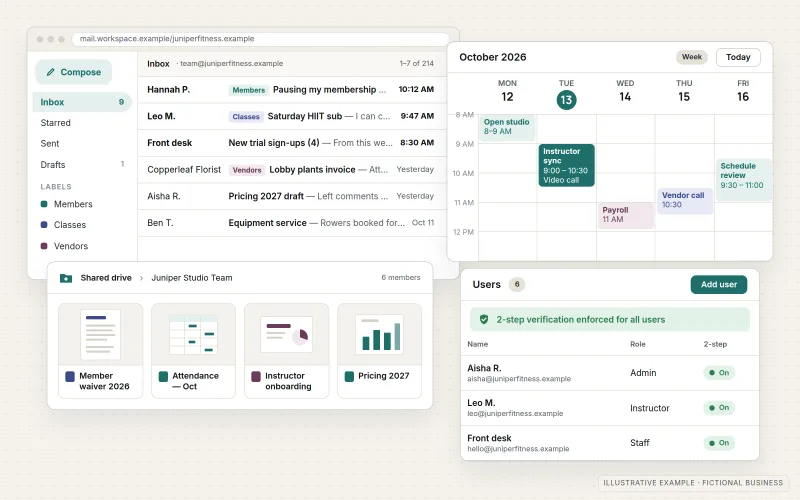
What IOPIA provides
What the work includes
- 01
Account and domain setup
A Google Workspace account created for the business, with the domain verified and mail records pointing to Gmail.
- 02
Users, groups and roles
User accounts, group addresses such as sales@ or support@, and admin roles limited to the people who need them.
- 03
Shared drives
Shared drives organized by team or function, so company files belong to the business instead of to whoever created them.
- 04
Calendar and Meet
Shared calendars, room and resource booking, and Meet settings configured for how the team schedules work.
- 05
Sign-in security
2-step verification enforced, recovery options set and sharing settings adjusted to suit the business.
- 06
Migration and administration
Mail, calendars and files moved from another provider, followed by ongoing handling of new staff, departures and changes.
Problems solved
When this helps
- The team uses personal Gmail accounts, so customer conversations disappear when someone leaves.
- Important files sit in individual My Drive folders and are shared one link at a time.
- Everyone has full admin rights because that was the quickest way to get started.
- The business wants to leave its current email provider but cannot afford to lose old messages.
Who it's for
- Businesses moving to Google Workspace from free accounts or another email provider
- Teams already on Google Workspace that grew without a structure for files and access
- Small organizations without anyone assigned to administer their accounts
A good fit when the team prefers working in the browser with Gmail, Docs and Drive and wants that environment set up and organized properly for the business.
Businesses that rely on desktop Word, Excel and Outlook, or are already standardized on Microsoft tools, are usually better served by Microsoft 365 Setup & Management.
How it works
A Google Workspace account
Select a part of the diagram to see what it does.
- The business domain is verified with Google, and its mail records point to Gmail.
- The Admin console holds every account, group and admin role, and enforces 2-step verification at sign-in.
- Each person's business email runs on Gmail under the company domain.
- Company files live in shared drives owned by the organization, so they stay put when people leave.
- Calendar, Meet and group addresses give the team shared scheduling and shared inboxes without extra tools.
Scope
Included, and not included
Included
- Google Workspace account creation and domain verification
- Gmail MX, SPF, DKIM and DMARC records
- Users, groups, aliases and admin roles
- Shared drive structure and file-sharing settings
- Calendar, resource and Meet configuration
- 2-step verification enforcement and account recovery settings
- Mail, calendar and file migration from another provider
- Ongoing administration as a managed option
Not included
- Google Workspace subscription costs, billed by Google or passed through as set out in the agreement
- Custom Apps Script or add-on development, which is scoped separately
- Purchasing or setting up computers, phones or other devices
- Recovering data that was deleted before the engagement and is outside Google's retention
Not sure where your project sits? Contact us about scope — we'll say plainly what fits.
Implementation
How implementation works
Inventory
List current accounts, mailboxes, shared files and who needs access to what.
Design
Agree on naming, groups, shared drives and which admin roles each person holds.
Configure
Verify the domain, create users and groups, and apply security and sharing settings.
Migrate
Copy mail, calendars and files from the old provider, then switch mail records at a planned time.
Administer
Handle new hires, departures, license changes and settings as an ongoing service.
- Project — a one-time implementation with a defined scope.
- Managed — a recurring service after launch.
Technologies
Platforms that may be involved
This service covers Google Workspace components including:
- Gmail
- Google Drive and shared drives
- Google Calendar
- Google Meet
- Google Groups
- Google Admin console
Platform names are used to describe the work. They do not indicate a partnership or certification.
Questions
- Should we choose Google Workspace or Microsoft 365?
- Both are capable business suites. Google Workspace tends to suit teams that work mostly in the browser and collaborate in shared documents in real time. Microsoft 365 tends to suit teams that depend on desktop Word, Excel and Outlook or exchange those files heavily with clients. IOPIA sets up either and can walk through how your team actually works before you decide.
- Can we move from Microsoft 365 or another provider without losing email?
- Yes, in most cases. Mail, calendars and files are copied before the switch, and the mail records are changed at a planned time so new messages keep arriving during the move.
- Who pays for Google Workspace?
- The subscription is a separate cost, billed by Google or passed through as set out in the agreement. IOPIA helps choose the edition that matches the features you need and keeps the number of paid accounts matched to actual users.
Discuss Google Workspace Setup & Management with IOPIA.
Describe the project or problem in your own words. Early-stage conversations are welcome — you don't need a finished brief.